
#binancefutures
binancefutures
20.5M views
114,061 Discussing
Hot
Latest
·
--
Bullish
#BossSignal 🤫🐂🚀
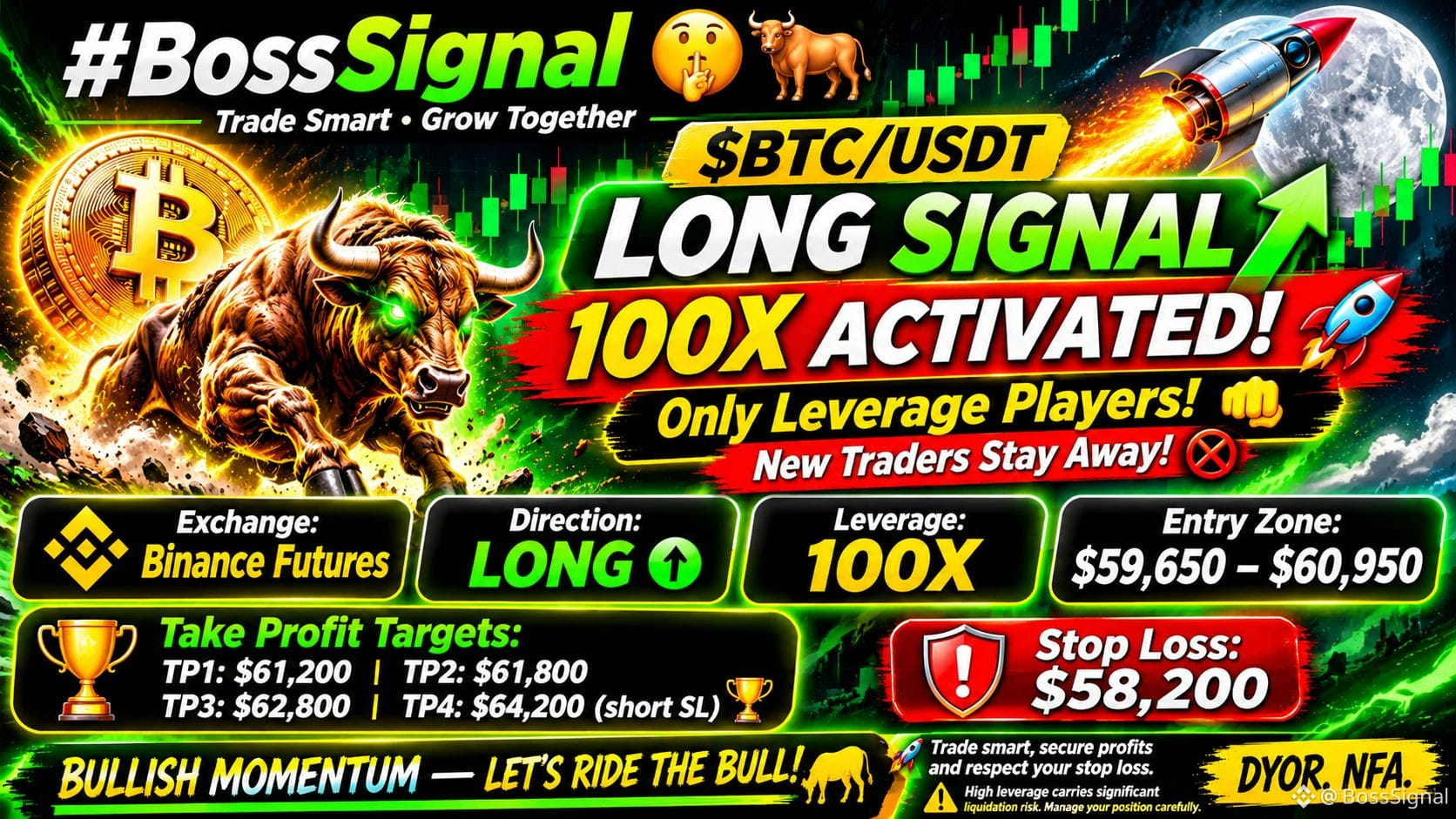
🔥 $BTC /USDT — 100X LONG SIGNAL ACTIVATED!
ONLY LEVERAGE PLAYERS — WELCOME ABOARD! 👊
New traders, stay away from this high-risk setup. This mission is strictly for experienced leverage traders!
🐂 Bitcoin Bullish Mission Is ON!
🚀 Trade Setup:
Exchange: Binance Futures
Direction: LONG 🟢
Leverage: 100X
Entry Zone: $59,650 – $60,950
🏆 Target Zone: $64,200
TP1: $61,200
TP2: $61,800
TP3: $62,800
TP4: $64,200
🛑 Stop Loss: $58,200
The rocket is ready. Let's see what the market has in store for us! 💥
#BossSignal — Trade Smart • Grow Together.
⚠️ 100X leverage carries an extreme liquidation risk. Not suitable for beginners. Manage your risk carefully. No guaranteed profits.
DYOR. NFA.
#BTC #Bitcoin #CryptoTrading #BinanceFutures #100XLeverage
1
101

·
--
Winning calls of the past 7 days
$DOGE SHORT: entry 0.057366 → TP2 0.054709, +4.6% move (+3.5R), called 20/11 02:50 UTC
$BNB SHORT: entry 573.49 → TP2 561.84, +2.0% move (+2.3R), called 20/11 02:15 UTC
ARB SHORT: entry 0.11899 → TP2 0.11049, +7.1% move (+2.0R), called 20/11 02:36 UTC
Each call was posted before the move with entry zone, stop and targets. Follow for the next setups. Automated technical signals, not financial advice. DYOR.
#TradingSignals #BinanceFutures #TakeProfit
51

Article
How to Set Stop-Loss and Take-Profit on Binance Futures (2027): Step-by-Step TP/SL GuideShort answer: On Binance Futures, you can add a stop-loss (SL) and take-profit (TP) when you open a trade by ticking the TP/SL box, or later from the Positions tab. Choose whether it triggers on the Mark Price or the Last Price, use a Stop Market order for your stop-loss so it actually fills, and size your position so that hitting the stop-loss only costs a small, planned part of your account.
1. WHAT ARE STOP-LOSS AND TAKE-PROFIT?
🔸 Stop-loss (SL): closes your position automatically when the price moves against you, so a loss stays small and planned
🔸 Take-profit (TP): closes your position automatically when the price reaches your target, so you lock in the gain
On Binance Futures, both are stop orders. Binance decides whether an order is a stop-loss or a take-profit by comparing the trigger price with the current price.
Your stop-loss should always sit well before your liquidation price. Liquidation takes your margin and adds a clearance fee, while a stop-loss exits at a level you chose.
[https://www.binance.com/en/square/post/389195106060486](https://www.binance.com/en/square/post/389195106060486)
2. TWO WAYS TO SET TP/SL
A) When you open a trade
1. Enter your order price and size
2. Tick the [TP/SL] box
3. Enter your Take Profit and Stop Loss prices
4. Choose the trigger: Mark Price or Last Price
5. Click Buy/Long or Sell/Short
😎 On a position that is already open
1. Go to the Positions tab under the chart
2. Click [Add] under TP/SL
3. Choose the Take Profit or Stop Loss tab
4. Pick the order type (Limit or Market) and enter the trigger price
5. Confirm
Tip: Binance also lets you set TP/SL by expected PnL, ROI% or a percentage offset instead of a fixed price. You can also split one position into several TP or SL targets, for example taking half the profit at the first target and the rest at the second.
When you close the position, any TP/SL attached to it is cancelled automatically.
3. MARK PRICE OR LAST PRICE: WHICH TRIGGER TO USE?
🔸 Last Price: the price of the latest trade. Your stop follows every move, including short wicks.
🔸 Mark Price: Binance's estimate of the contract's fair value. It moves more smoothly and ignores most short spikes.
Which to choose:
✅ Mark Price if you want to avoid being stopped out by a sudden wick
✅ Last Price if you want your stop to react exactly to the prices you see traded
Remember that liquidation on Binance Futures is always based on the Mark Price.
[https://www.binance.com/en/square/post/390599936633765](https://www.binance.com/en/square/post/390599936633765)
4. STOP MARKET VS STOP LIMIT
When your stop is triggered, Binance places an order. You choose which kind:
Stop Market:
🔸 Becomes a market order when triggered
✅ Almost always fills
❌ The price can slip in a fast move
✅ The safest choice for stop-losses
Stop Limit:
🔸 Becomes a limit order at your chosen price
✅ You control the exit price
❌ In a fast drop, it may not fill at all and leave your position open
❌ Risky for stop-losses
A stop-loss that does not fill is not a stop-loss. For protection, use Stop Market. For take-profits, a limit order is fine because you are not in a hurry.
Note: a Stop Market order executes as a taker order. Learn how maker and taker fees work:
[https://www.binance.com/en/square/post/387471341496894](https://www.binance.com/en/square/post/387471341496894)
5. HOW TO SIZE YOUR POSITION FROM YOUR STOP-LOSS
Many traders pick a position size first and a stop-loss later. Do the opposite: decide how much you are willing to lose, set your stop-loss, then work out the size.
📊 Example: the 1% rule
🔸 Futures account: $1,000
🔸 Maximum risk per trade (1%): $10
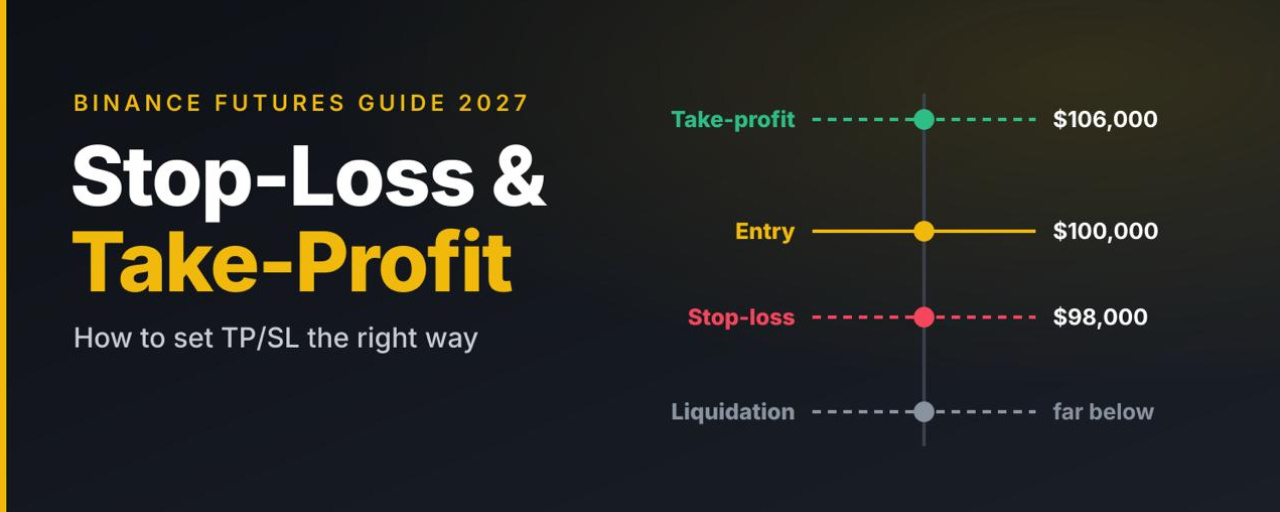
🔸 Long BTC at $100,000, stop-loss at $98,000 = 2% distance
🔸 Position size = $10 ÷ 2% = $500
If the stop-loss is hit, you lose about $10 plus fees, no matter which leverage you use. Leverage only changes how much margin the $500 position ties up. Lower leverage still keeps your liquidation price further away, which gives your stop-loss more room.
6. COMMON TP/SL MISTAKES
❌ Opening a trade without a stop-loss and "adding it later"
❌ Placing the stop-loss beyond the liquidation price
❌ Using Stop Limit for a stop-loss in a volatile market
❌ Moving the stop-loss further away when the price gets close
❌ Setting the stop so tight that normal price noise triggers it
❌ Forgetting that the funding rate slowly reduces your margin on positions held for days
[https://www.binance.com/en/square/post/388465048575388](https://www.binance.com/en/square/post/388465048575388)
Quick checklist before every trade:
[https://www.binance.com/en/square/post/389991987267585](https://www.binance.com/en/square/post/389991987267585)
FAQ
❓ How do I set a stop-loss on Binance Futures?
Tick the [TP/SL] box when you open a trade, or go to the Positions tab and click [Add] under TP/SL.
❓ Should I use Mark Price or Last Price for my stop-loss?
Mark Price helps avoid being stopped out by short wicks. Last Price reacts to every traded price. Choose based on your strategy.
❓ What is the difference between Stop Market and Stop Limit?
Stop Market becomes a market order and almost always fills. Stop Limit becomes a limit order and may not fill in a fast move.
❓ Can I set more than one take-profit?
Yes. You can split a position into several TP or SL targets with different sizes.
❓ What happens to my TP/SL when I close the position?
TP/SL orders attached to the position are cancelled automatically.
❓ Does leverage change how much I lose at my stop-loss?
No. Your loss at the stop-loss depends on position size and stop distance. Leverage changes the margin used and how close liquidation is.
Referral code: LONG2027
Sign up: [https://www.binance.com/en/events/referral-code-2027](https://www.binance.com/en/events/referral-code-2027)
Independent educational content, not affiliated with or endorsed by Binance. Futures trading involves leverage and can lead to the loss of your entire margin. A stop-loss does not guarantee an exact exit price.
#BinanceFutures #StopLoss #TakeProfit #RiskManagement #CryptoTrading
How to Set Stop-Loss and Take-Profit on Binance Futures (2027): Step-by-Step TP/SL Guide
Short answer: On Binance Futures, you can add a stop-loss (SL) and take-profit (TP) when you open a trade by ticking the TP/SL box, or later from the Positions tab. Choose whether it triggers on the Mark Price or the Last Price, use a Stop Market order for your stop-loss so it actually fills, and size your position so that hitting the stop-loss only costs a small, planned part of your account.
1. WHAT ARE STOP-LOSS AND TAKE-PROFIT?
🔸 Stop-loss (SL): closes your position automatically when the price moves against you, so a loss stays small and planned
🔸 Take-profit (TP): closes your position automatically when the price reaches your target, so you lock in the gain
On Binance Futures, both are stop orders. Binance decides whether an order is a stop-loss or a take-profit by comparing the trigger price with the current price.
Your stop-loss should always sit well before your liquidation price. Liquidation takes your margin and adds a clearance fee, while a stop-loss exits at a level you chose.
https://www.binance.com/en/square/post/389195106060486
2. TWO WAYS TO SET TP/SL
A) When you open a trade
1. Enter your order price and size
2. Tick the [TP/SL] box
3. Enter your Take Profit and Stop Loss prices
4. Choose the trigger: Mark Price or Last Price
5. Click Buy/Long or Sell/Short
😎 On a position that is already open
1. Go to the Positions tab under the chart
2. Click [Add] under TP/SL
3. Choose the Take Profit or Stop Loss tab
4. Pick the order type (Limit or Market) and enter the trigger price
5. Confirm
Tip: Binance also lets you set TP/SL by expected PnL, ROI% or a percentage offset instead of a fixed price. You can also split one position into several TP or SL targets, for example taking half the profit at the first target and the rest at the second.
When you close the position, any TP/SL attached to it is cancelled automatically.
3. MARK PRICE OR LAST PRICE: WHICH TRIGGER TO USE?
🔸 Last Price: the price of the latest trade. Your stop follows every move, including short wicks.
🔸 Mark Price: Binance's estimate of the contract's fair value. It moves more smoothly and ignores most short spikes.
Which to choose:
✅ Mark Price if you want to avoid being stopped out by a sudden wick
✅ Last Price if you want your stop to react exactly to the prices you see traded
Remember that liquidation on Binance Futures is always based on the Mark Price.
https://www.binance.com/en/square/post/390599936633765
4. STOP MARKET VS STOP LIMIT
When your stop is triggered, Binance places an order. You choose which kind:
Stop Market:
🔸 Becomes a market order when triggered
✅ Almost always fills
❌ The price can slip in a fast move
✅ The safest choice for stop-losses
Stop Limit:
🔸 Becomes a limit order at your chosen price
✅ You control the exit price
❌ In a fast drop, it may not fill at all and leave your position open
❌ Risky for stop-losses
A stop-loss that does not fill is not a stop-loss. For protection, use Stop Market. For take-profits, a limit order is fine because you are not in a hurry.
Note: a Stop Market order executes as a taker order. Learn how maker and taker fees work:
https://www.binance.com/en/square/post/387471341496894
5. HOW TO SIZE YOUR POSITION FROM YOUR STOP-LOSS
Many traders pick a position size first and a stop-loss later. Do the opposite: decide how much you are willing to lose, set your stop-loss, then work out the size.
📊 Example: the 1% rule
🔸 Futures account: $1,000
🔸 Maximum risk per trade (1%): $10
🔸 Long BTC at $100,000, stop-loss at $98,000 = 2% distance
🔸 Position size = $10 ÷ 2% = $500
If the stop-loss is hit, you lose about $10 plus fees, no matter which leverage you use. Leverage only changes how much margin the $500 position ties up. Lower leverage still keeps your liquidation price further away, which gives your stop-loss more room.
6. COMMON TP/SL MISTAKES
❌ Opening a trade without a stop-loss and "adding it later"
❌ Placing the stop-loss beyond the liquidation price
❌ Using Stop Limit for a stop-loss in a volatile market
❌ Moving the stop-loss further away when the price gets close
❌ Setting the stop so tight that normal price noise triggers it
❌ Forgetting that the funding rate slowly reduces your margin on positions held for days
https://www.binance.com/en/square/post/388465048575388
Quick checklist before every trade:
https://www.binance.com/en/square/post/389991987267585
FAQ
❓ How do I set a stop-loss on Binance Futures?
Tick the [TP/SL] box when you open a trade, or go to the Positions tab and click [Add] under TP/SL.
❓ Should I use Mark Price or Last Price for my stop-loss?
Mark Price helps avoid being stopped out by short wicks. Last Price reacts to every traded price. Choose based on your strategy.
❓ What is the difference between Stop Market and Stop Limit?
Stop Market becomes a market order and almost always fills. Stop Limit becomes a limit order and may not fill in a fast move.
❓ Can I set more than one take-profit?
Yes. You can split a position into several TP or SL targets with different sizes.
❓ What happens to my TP/SL when I close the position?
TP/SL orders attached to the position are cancelled automatically.
❓ Does leverage change how much I lose at my stop-loss?
No. Your loss at the stop-loss depends on position size and stop distance. Leverage changes the margin used and how close liquidation is.
Referral code: LONG2027
Sign up: https://www.binance.com/en/events/referral-code-2027
Independent educational content, not affiliated with or endorsed by Binance. Futures trading involves leverage and can lead to the loss of your entire margin. A stop-loss does not guarantee an exact exit price.
#BinanceFutures #StopLoss #TakeProfit #RiskManagement #CryptoTrading
3
96

·
--
🔥 FUTURES COINS TO WATCH TODAY! 🚀
👀 $BLESS
{future}(BLESSUSDT)
🔥 $PROM
{future}(PROMUSDT)
⚡ $TA
{future}(TAUSDT)
These three are catching my attention for potential futures trading opportunities.
Keep an eye on price action and trading volume. Let's see which one makes the next interesting move! 📊🔥
#BinanceFutures #AltcoinMomentum #CryptoGainers #FuturesTrading #MarketMovers
Which one are you Trading today ?
🔥 FUTURES COINS TO WATCH TODAY! 🚀
👀 $BLESS
🔥 $PROM
⚡ $TA
These three are catching my attention for potential futures trading opportunities.
Keep an eye on price action and trading volume. Let's see which one makes the next interesting move! 📊🔥
#BinanceFutures #AltcoinMomentum #CryptoGainers #FuturesTrading #MarketMovers
Which one are you Trading today ?
BLESS
PROM
TA
21 hr(s) left
1
4
1.3k

·
--
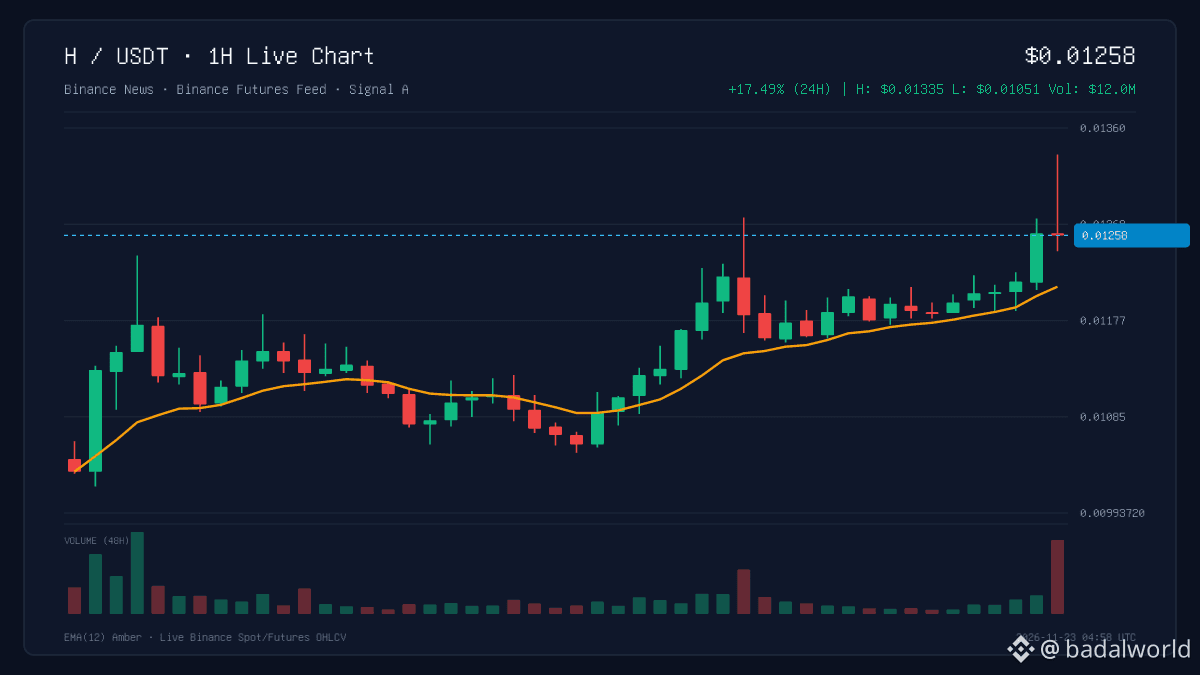
Binance Futures adds Anthropic (ANTB) as collateral today, signaling a deeper push into tokenized assets while the broader market consolidates at a $2.09T cap. Looking at the HUSDT 1H chart attached, we are seeing a steady +17.49% grind, though volume remains modest at $12M. While the major pairs like $BTC and $ETH are seeing significant net positive taker flow, the volatility is shifting toward smaller caps like BULLA and BLESS. I am keeping a close eye on these liquidity shifts as the market structure faces pressure with BTC dominance holding at 58.8%.
Remember that market volatility can flip positions in seconds, so manage your leverage accordingly. NFA/DYOR. With BTC dominance this high, are you rotating your realized gains into these high-beta movers, or holding the majors until we see a definitive breakout above current resistance?
#BinanceSquare #BinanceFutures #Crypto
4

$XRP futures plan: limit short on #XRPUSD Perp at 0.9520 📉
Setup (Binance Futures, USDⓈ-M):
• Pair: #XRPUSD Perpetual
• Side: Short
• Entry: limit 0.9520
• Stop-loss: 0.9640
• TP1: 0.9280 (close 50%, stop to entry)
• TP2: 0.9130
• Margin: isolated, 2–3x
• R:R: 1:2 to TP1, 1:3.25 to TP2
Why:
• Weakest bounce of the majors after the weekend flush, under 2% in 24h vs 3–5% for most
• Stacked resistance at 0.9415–0.9600: old 5-day floor, 4H EMA50, 1H EMA200
• Liquidation clusters above price at 0.9394 and 0.9555, so I expect a sweep up before any move down
• Funding is neutral and open interest is down about 12% in 5 days
Invalidation:
• BTC 1H close above 62,930 → I cancel the order
• XRP under 0.9110 before the fill → I cancel, the move left without me
The order may never fill. No fill, no trade. US open and flash PMIs come later today, so expect volatility.
$BTC #XRP #XRPUSD #BinanceFutures #FuturesTrading
{future}(XRPUSDT)
$XRP futures plan: limit short on #XRPUSD Perp at 0.9520 📉
Setup (Binance Futures, USDⓈ-M):
• Pair: #XRPUSD Perpetual
• Side: Short
• Entry: limit 0.9520
• Stop-loss: 0.9640
• TP1: 0.9280 (close 50%, stop to entry)
• TP2: 0.9130
• Margin: isolated, 2–3x
• R:R: 1:2 to TP1, 1:3.25 to TP2
Why:
• Weakest bounce of the majors after the weekend flush, under 2% in 24h vs 3–5% for most
• Stacked resistance at 0.9415–0.9600: old 5-day floor, 4H EMA50, 1H EMA200
• Liquidation clusters above price at 0.9394 and 0.9555, so I expect a sweep up before any move down
• Funding is neutral and open interest is down about 12% in 5 days
Invalidation:
• BTC 1H close above 62,930 → I cancel the order
• XRP under 0.9110 before the fill → I cancel, the move left without me
The order may never fill. No fill, no trade. US open and flash PMIs come later today, so expect volatility.
$BTC #XRP #XRPUSD #BinanceFutures #FuturesTrading
1
167

·
--
Bearish
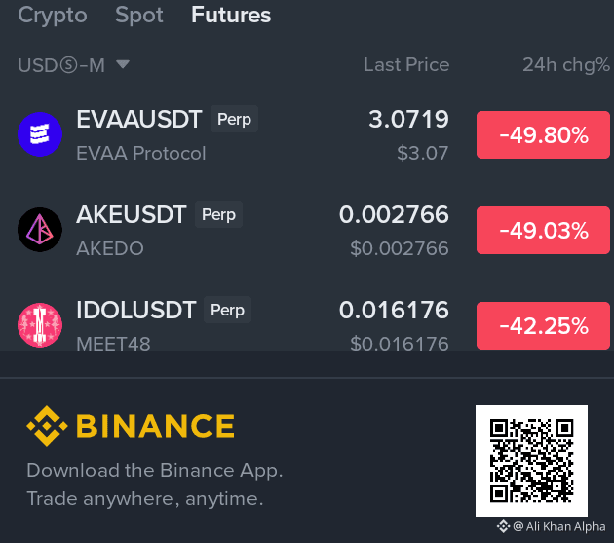
Brutal session.📉 Three Binance futures lost 40%+ in 24h:$EVAA USDT-49.8%,$AKE USDT-49.0%, $IDOL USDT -42.3%. Panic selling or a shakeout? Which one bounces first? Vote below 👇 #EVAA #AKE #IDOL #BinanceFutures #AlikhanAlpha @BiBi [https://www.binance.com/download?utm_medium=screenshot](https://www.binance.com/download?utm_medium=screenshot)
{future}(EVAAUSDT)
{future}(AKEUSDT)
{future}(IDOLUSDT)
Brutal session.📉 Three Binance futures lost 40%+ in 24h:$EVAA USDT-49.8%,$AKE USDT-49.0%, $IDOL USDT -42.3%. Panic selling or a shakeout? Which one bounces first? Vote below 👇 #EVAA #AKE #IDOL #BinanceFutures #AlikhanAlpha @Binance BiBi https://www.binance.com/download?utm_medium=screenshot
Shaithaan:
Maybe
4
8
5.3k

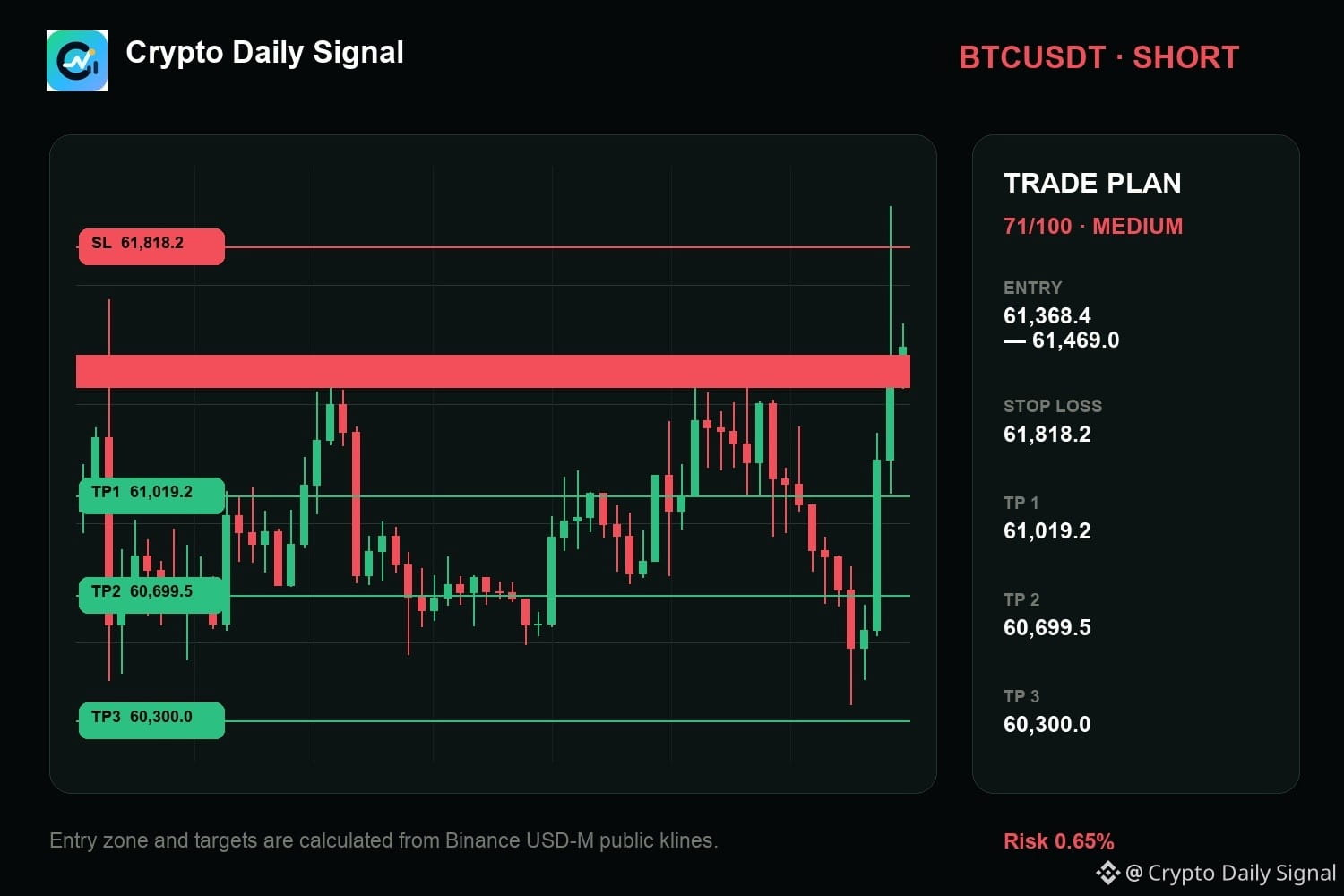
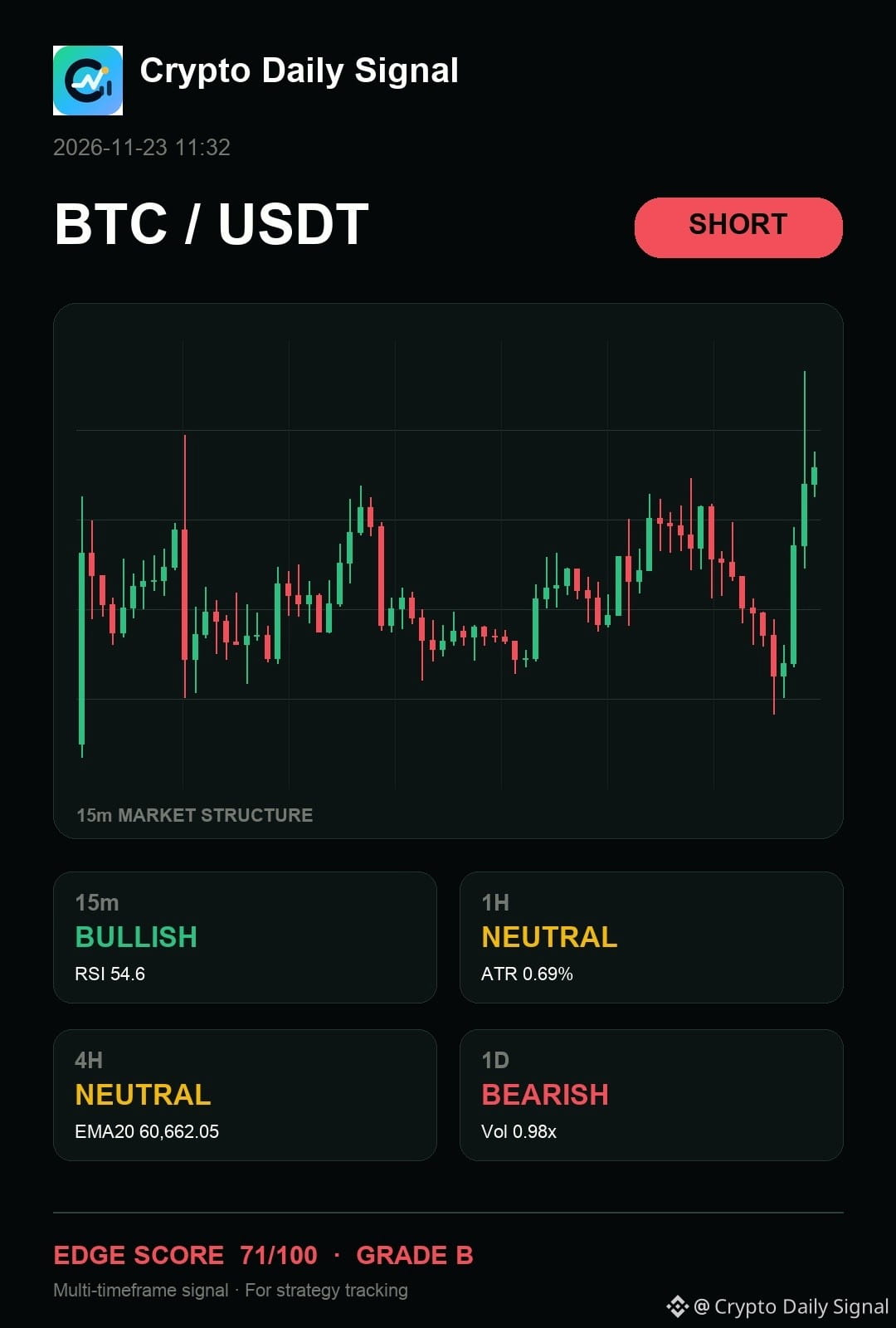
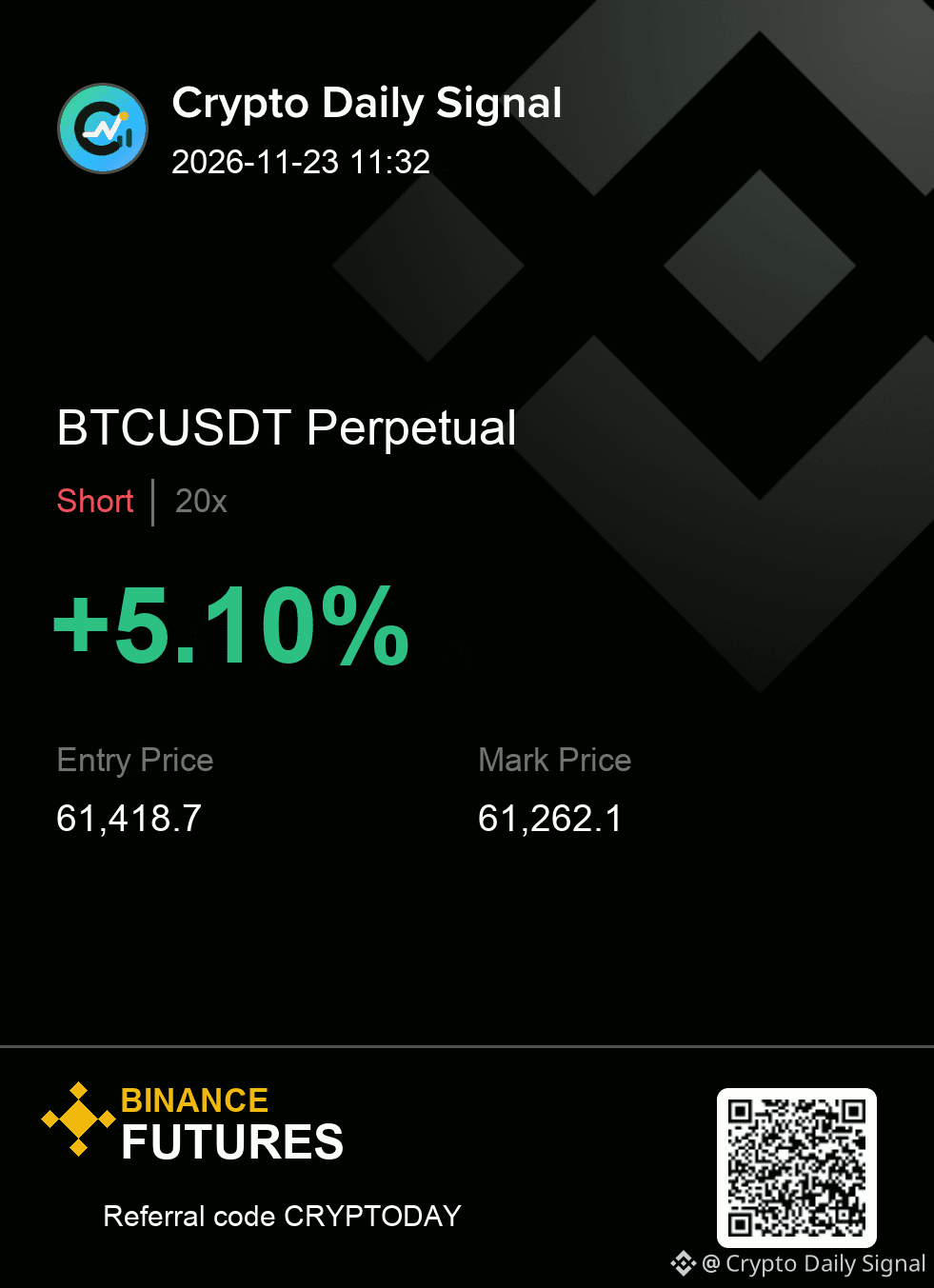
$BTC has a short map worth monitoring. Broader price action remains bearish and the four-hour structure is neutral. I want confirmation from the zone before adding risk, because a move through the cut level would cancel the thesis immediately.
SHORT plan for BTCUSDT
61,368.4 - 61,469.0 entry | 61,818.2 stop
61,019.2 → 60,699.5 → 60,300.0
#BinanceFutures
{future}(BTCUSDT)
$BTC has a short map worth monitoring. Broader price action remains bearish and the four-hour structure is neutral. I want confirmation from the zone before adding risk, because a move through the cut level would cancel the thesis immediately.
SHORT plan for BTCUSDT
61,368.4 - 61,469.0 entry | 61,818.2 stop
61,019.2 → 60,699.5 → 60,300.0
#BinanceFutures
SHORT plan for BTCUSDT
61,368.4 - 61,469.0 entry | 61,818.2 stop
61,019.2 → 60,699.5 → 60,300.0
#BinanceFutures
62
·
--
Bullish
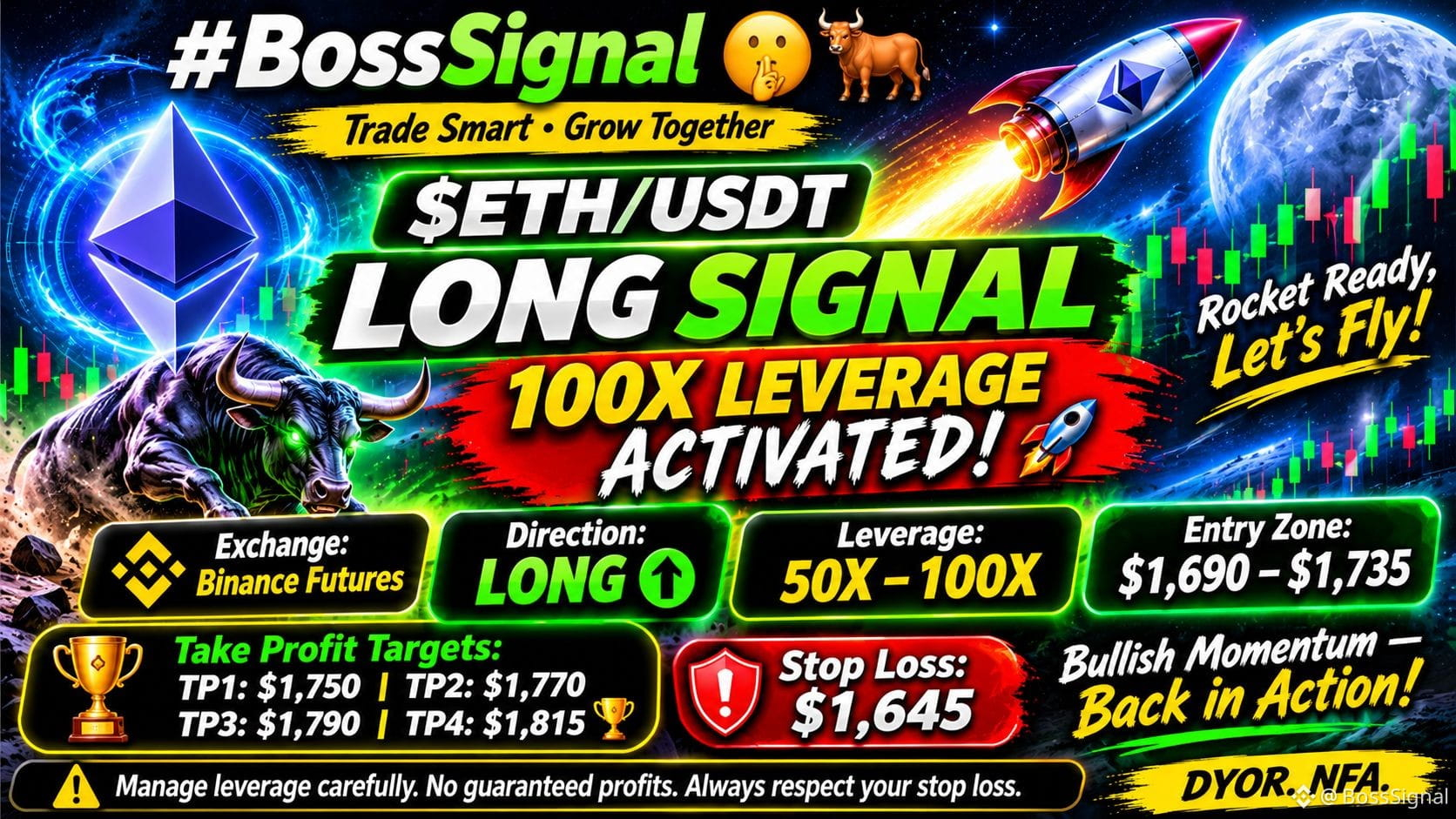
#BossSignal 🤫🐂🚀
🔥 $ETH /USDT — 100X LONG SIGNAL ACTIVATED!
The rocket is READY! The market is our next destination! 🚀
⚡ 100X LEVERAGE PLAYERS — WELCOME ABOARD!
Ethereum is on our watchlist for a bullish move. Let's see what the market delivers! 👊
📊 Trade Setup:
Exchange: Binance Futures
Direction: LONG 🟢
Leverage: 50X–100X
Entry Zone: $1,690 – $1,735
🎯 Profit Targets:
TP1: $1,750
TP2: $1,770
TP3: $1,790
TP4: $1,815 🏆
🛑 Stop Loss: $1,645
🐂 BULLISH MOMENTUM — BACK IN ACTION!
🚀 Rocket Ready. Pilot Ready. Let's Fly!
⚠️ Beginners: Stick to 10X–20X or lower according to your risk tolerance. 100X leverage is extremely risky and can lead to rapid liquidation. No guaranteed profits.
DYOR. NFA.
#ETH #Ethereum #BinanceFutures #100XLeverage #CryptoTrading
1
109

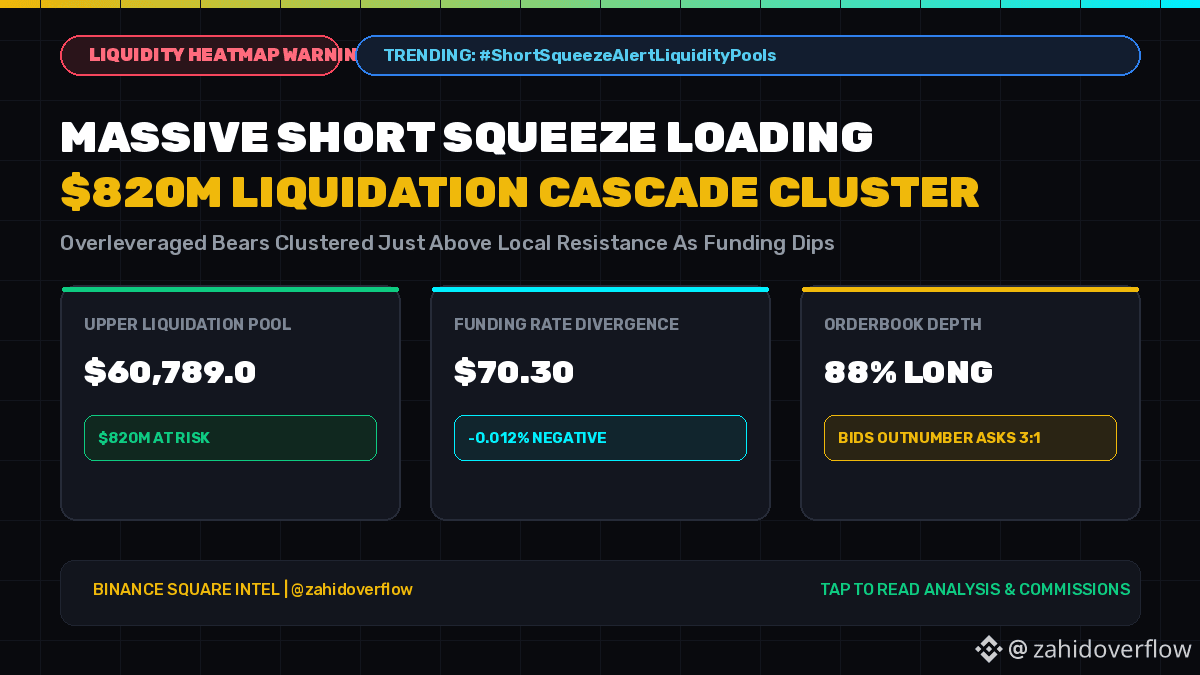
📊 MARKET SENSORY ALERT: Over $820M in Short Positions Sitting in the Crosshairs!
Derivatives orderbook heatmaps across Binance Futures show an explosive cluster of short liquidation levels stacked tightly above current resistance.
Crucial Takeaways:
1. Asymmetry in Risk: When funding flips negative during strong structural support, market makers naturally hunt resting stops above.
2. Execution Hygiene: Never chase green candles with market orders. Always position ahead using resting limit maker orders to capture 0.00% fees.
3. Capital Protection: Setting pre-calculated Take-Profit and Stop-Loss brackets ensures emotionless, systematic compounding.
Where do you see the market breaking next? Bull or Bear trap? Drop your prediction! 👇
#ShortSqueeze #BinanceFutures #CryptoAnalysis #RiskManagement $BTC $USDC
20

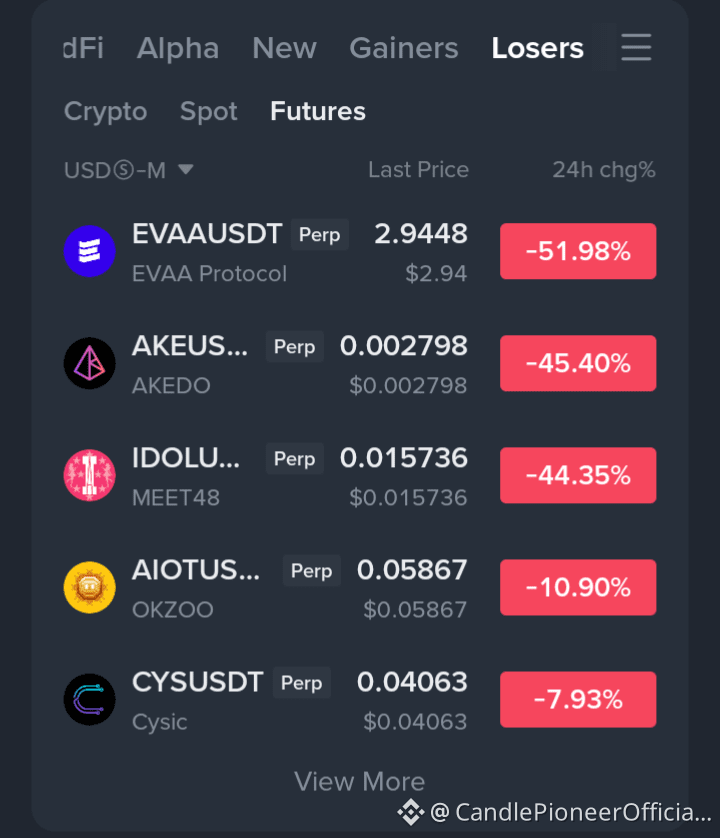
🚨 Heavy selling pressure in Binance Futures!
The top visible losers are showing significant 24H declines:
$EVAA USDT: -51.98%
$AKE USDT (AKEDO): -45.40%
$IDOL USDT (MEET48): -44.35%
All three are facing strong downside pressure. The big question now is whether buyers will step in or sellers will continue dominating.
👀 Which coin are you watching for a possible recovery?
#BinanceFutures #CryptoMarket #Altcoins! #trading
{future}(EVAAUSDT)
{future}(AKEUSDT)
{future}(IDOLUSDT)
🚨 Heavy selling pressure in Binance Futures!
The top visible losers are showing significant 24H declines:
$EVAA USDT: -51.98%
$AKE USDT (AKEDO): -45.40%
$IDOL USDT (MEET48): -44.35%
All three are facing strong downside pressure. The big question now is whether buyers will step in or sellers will continue dominating.
👀 Which coin are you watching for a possible recovery?
#BinanceFutures #CryptoMarket #Altcoins! #trading
785

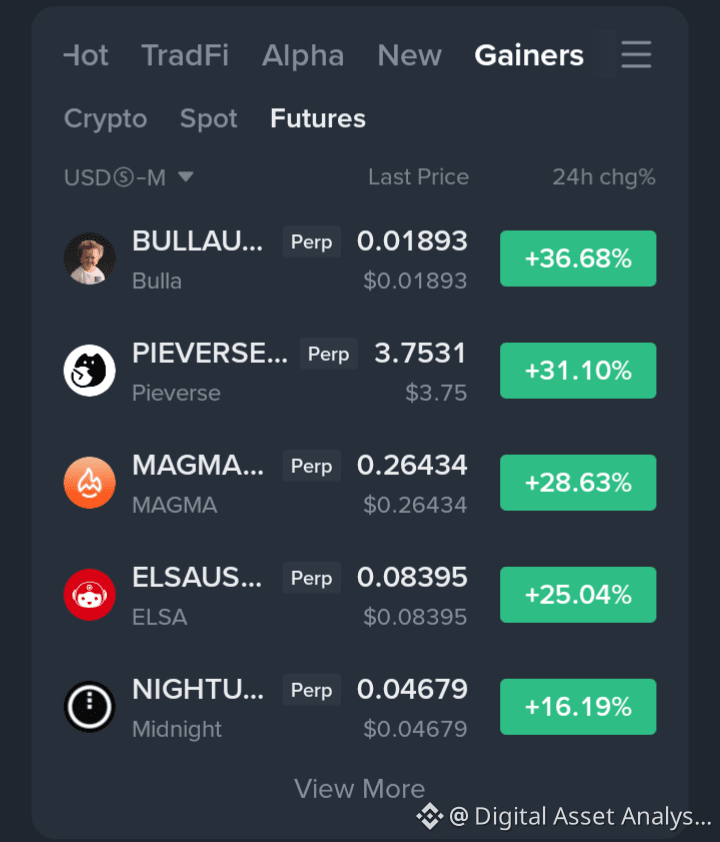
🔥 Which Futures gainer has your attention today?
The Binance Futures leaderboard is showing some strong moves. Here are the top visible gainers:
$BULLA — +36.68%
$PIEVERSE — +31.10%
$MAGMA — +28.63%
All three are showing positive 24-hour performance, but will this momentum continue or do we see a pullback next?
Which one are you watching closely?
#BinanceFutures #CryptoGainers #altcoins #trading
{future}(BULLAUSDT)
{future}(PIEVERSEUSDT)
{future}(MAGMAUSDT)
🔥 Which Futures gainer has your attention today?
The Binance Futures leaderboard is showing some strong moves. Here are the top visible gainers:
$BULLA — +36.68%
$PIEVERSE — +31.10%
$MAGMA — +28.63%
All three are showing positive 24-hour performance, but will this momentum continue or do we see a pullback next?
Which one are you watching closely?
#BinanceFutures #CryptoGainers #altcoins #trading
520


·
--
Bullish
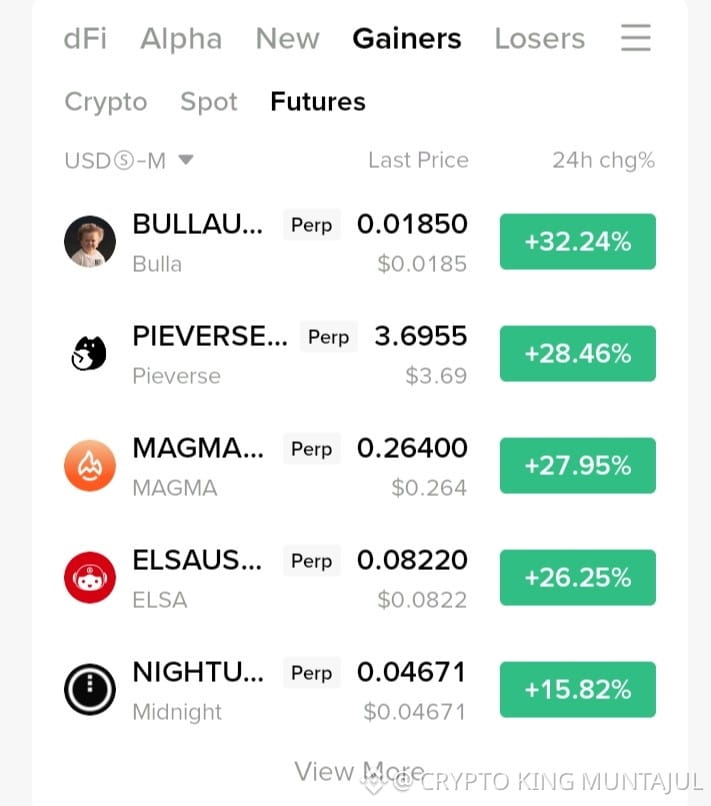
Futures Gainers Spotlight on Binance
Momentum is heating up across USDⓈ M perpetuals as liquidity rotates into high velocity movers. Five standout gainers are leading the 24h board:
• $BULLA
{future}(BULLAUSDT)
Perp at 0.01850 (+32.24%) setting the pace on percentage gains
• $PIEVERSE
{future}(PIEVERSEUSDT)
Perp at 3.6955 (+28.46%) showing strong continuation push
• $MAGMA
{future}(MAGMAUSDT)
Perp at 0.26400 (+27.95%) building steady upward pressure
• ELSA Perp at 0.08220 (+26.25%) holding firm bullish traction
• NIGHTU Perp at 0.04671 (+15.82%) extending green momentum
Fast movers on perpetuals bring sharp swings and sudden squeezes. Watch volume confirmation and key support zones before chasing green candles, and always manage leverage carefully.
Which of these five are you tracking right now?
By CRYPTO KING MUNTAJUL
#BinanceFutures #CryptoTrading #altcoins #MarketUpdate #tradingmindset
Would you like a more aggressive trading call style or a shorter punchy caption to pair with your graphic?
Futures Gainers Spotlight on Binance
Momentum is heating up across USDⓈ M perpetuals as liquidity rotates into high velocity movers. Five standout gainers are leading the 24h board:
• $BULLA
Perp at 0.01850 (+32.24%) setting the pace on percentage gains
• $PIEVERSE
Perp at 3.6955 (+28.46%) showing strong continuation push
• $MAGMA
Perp at 0.26400 (+27.95%) building steady upward pressure
• ELSA Perp at 0.08220 (+26.25%) holding firm bullish traction
• NIGHTU Perp at 0.04671 (+15.82%) extending green momentum
Fast movers on perpetuals bring sharp swings and sudden squeezes. Watch volume confirmation and key support zones before chasing green candles, and always manage leverage carefully.
Which of these five are you tracking right now?
By CRYPTO KING MUNTAJUL
#BinanceFutures #CryptoTrading #altcoins #MarketUpdate #tradingmindset
Would you like a more aggressive trading call style or a shorter punchy caption to pair with your graphic?
1
595

·
--
Bearish
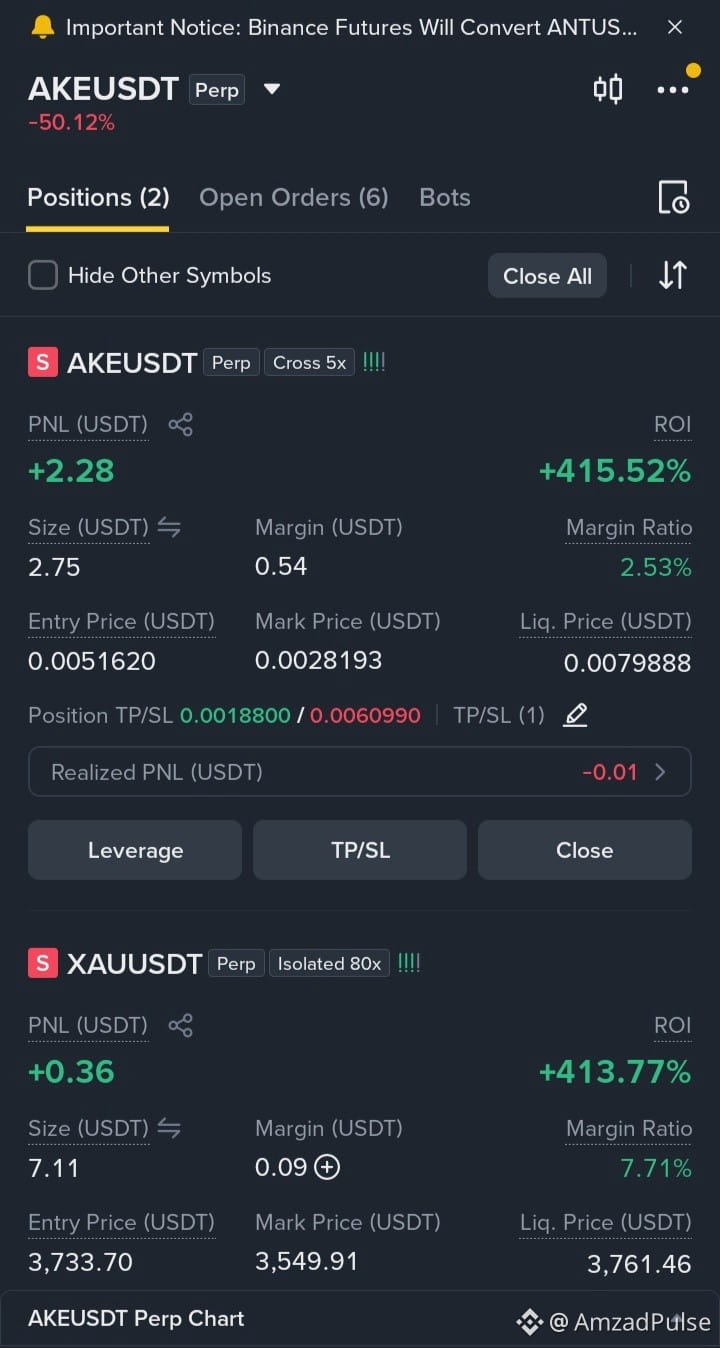
🔥 My Binance Futures Trades Are in Profit🚀
📉 $AKE (Short): +415.52% ROI
🥇 $XAU (Short): +413.77% ROI
Two active positions both delivering strong returns! 💰🔥
#BinanceFutures #AKEUSDT #XAUUSDT #TradingTales
{alpha}(560x2c3a8ee94ddd97244a93bc48298f97d2c412f7db)
{future}(XAUUSDT)
🔥 My Binance Futures Trades Are in Profit🚀
📉 $AKE (Short): +415.52% ROI
🥇 $XAU (Short): +413.77% ROI
Two active positions both delivering strong returns! 💰🔥
#BinanceFutures #AKEUSDT #XAUUSDT #TradingTales
📉 $AKE (Short): +415.52% ROI
🥇 $XAU (Short): +413.77% ROI
Two active positions both delivering strong returns! 💰🔥
#BinanceFutures #AKEUSDT #XAUUSDT #TradingTales
Subculture:
Strong “returns”… bro you made roughly $2.56 on both trades 🤣
2
14
8.2k
·
--
📈 Futures movers today: who's leading the board?
A quick scan of the USDⓈ-M perpetuals list shows a few big gainers:
🔹 $PIEVERSE: +62.70%
🔹 $BULLA A: +22.97%
🔹 $MAGIC MA: +22.93%
🔹 $ELSA : +18.13%
🔹 $VVV: +17.63%
🔹 $COOKIE: +15.33%
🔹 $NIGHT: +14.59%
What I'm watching:
✅ Funding rates. PIEVERSE, BULLA and ELSA are showing funding above 0.04%. That means longs are paying shorts to hold, which often signals a crowded trade.
✅ Volume vs. price. A big percentage gain on thin volume can reverse quickly. I look for moves backed by real volume, not just a spike.
✅ Risk first. Moves like +60% in a day can reverse just as fast. I decide my stop-loss and position size before I enter, and I never chase green candles on high leverage.
Are you trading momentum or waiting for pullbacks? Tell me in the comments 👇
Not financial advice. Do your own research and manage your risk.
#BinanceSquare #BinanceFutures #Crypto #FuturesTrading #RiskManagement
1
748
⚠️ Which futures coin could recover first after this heavy sell-off?
The Binance Futures losers list is showing strong downside pressure. $EVAA is down 47.59%, while $AKE has dropped 46.52% in the last 24 hours. $BLESS is also under pressure.
But here's the interesting question: Are traders waiting for a bounce, or is more downside coming?
#BinanceFutures #cryptotrading #altcoins #EVAA #AKE
{future}(EVAAUSDT)
What is your market view?
⚠️ Which futures coin could recover first after this heavy sell-off?
The Binance Futures losers list is showing strong downside pressure. $EVAA is down 47.59%, while $AKE has dropped 46.52% in the last 24 hours. $BLESS is also under pressure.
But here's the interesting question: Are traders waiting for a bounce, or is more downside coming?
#BinanceFutures #cryptotrading #altcoins #EVAA #AKE
What is your market view?
Strong recovery soon 📈
59%
Another drop ahead 📉
35%
Sideways consolidation ↔️
3%
Waiting for confirmation 👀
3%
120 votes • Voting closed
12.6k

·
--
Bullish
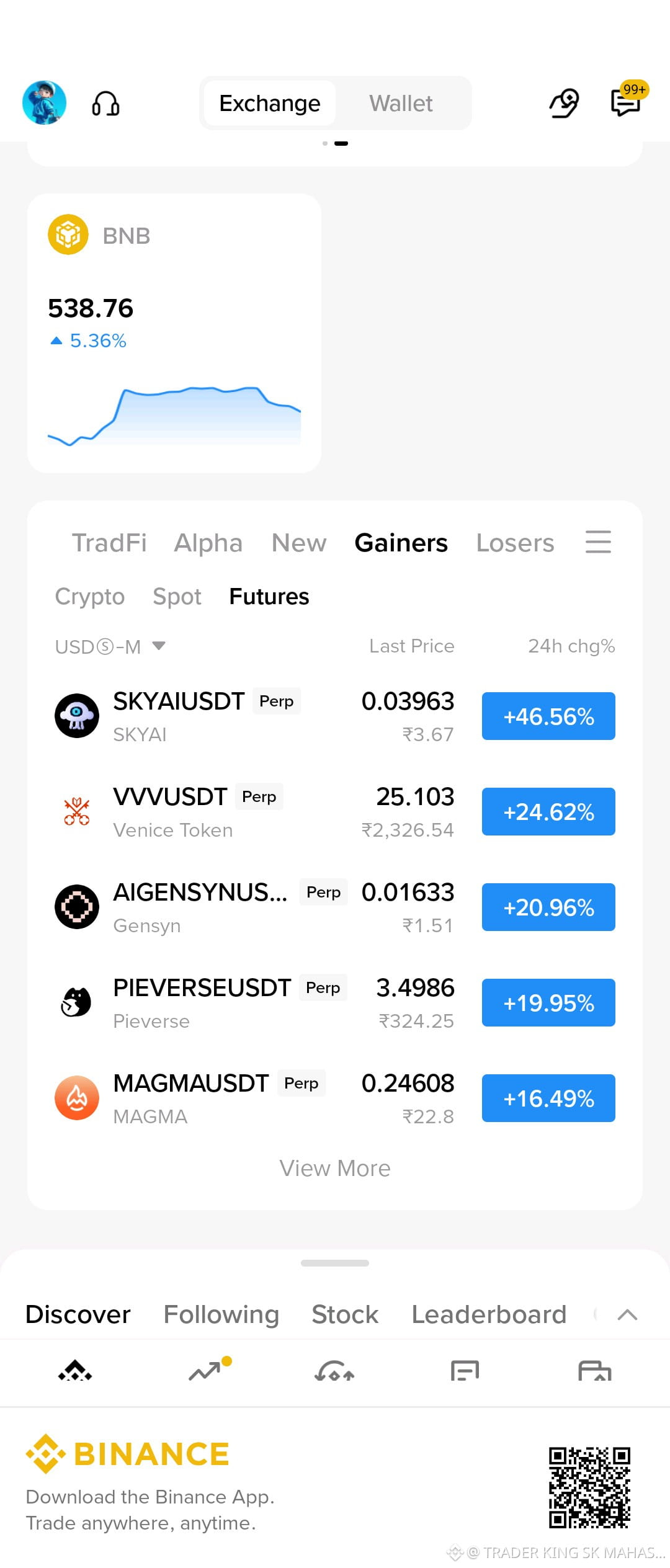
AI Momentum Dominates the Binance Futures Gainers Board
Market energy is heating up across perpetual contracts today, with BNB setting a steady baseline at $538.76 after climbing 5.36%. While major caps build structure, speculative liquidity is flowing straight into mid cap and AI driven tokens on the Binance Futures gainers list.
Here is how the top five perpetual movers are performing over the last 24 hours:
* SKYAI (SKYAIUSDT) leads the entire board with an explosive +46.56% rally, pushing its price to $0.03963.
* Venice Token ($VVV
{future}(VVVUSDT)
USDT) takes the second spot, advancing +24.62% to trade at $25.103.
* Gensyn continues the AI sector strength, rising +20.96% to reach $0.01633.
* Pieverse ($PIEVERSE
{future}(PIEVERSEUSDT)
USDT) follows closely with a +19.95% move, now sitting at $3.4986.
* MAGMA ($MAGMA
{future}(MAGMAUSDT)
USDT) rounds out the top five at $0.24608, posting a solid +16.49% gain.
The biggest takeaway from this leaderboard is the clear rotation back into AI narratives, with SKYAI, Venice Token, and Gensyn locking down the top three positions. However, sharp moves on perpetual futures often reflect aggressive leverage and rapid short covering rather than pure spot accumulation. Chasing green candles after a 20% to 46% expansion carries serious pullback risk if funding rates overheat or volume begins to fade.
Smart positioning here means tracking whether spot demand steps in to defend these breakout levels once initial volatility cools down.
Which token on this list has the strongest setup for continuation, and are you trading the breakout or waiting for a retest?
SKYAIVVV PIEVERSEMAGMA #BinanceFutures #CryptoMarketMoves #Altcoins
AI Momentum Dominates the Binance Futures Gainers Board
Market energy is heating up across perpetual contracts today, with BNB setting a steady baseline at $538.76 after climbing 5.36%. While major caps build structure, speculative liquidity is flowing straight into mid cap and AI driven tokens on the Binance Futures gainers list.
Here is how the top five perpetual movers are performing over the last 24 hours:
* SKYAI (SKYAIUSDT) leads the entire board with an explosive +46.56% rally, pushing its price to $0.03963.
* Venice Token ($VVV
USDT) takes the second spot, advancing +24.62% to trade at $25.103.
* Gensyn continues the AI sector strength, rising +20.96% to reach $0.01633.
* Pieverse ($PIEVERSE
USDT) follows closely with a +19.95% move, now sitting at $3.4986.
* MAGMA ($MAGMA
USDT) rounds out the top five at $0.24608, posting a solid +16.49% gain.
The biggest takeaway from this leaderboard is the clear rotation back into AI narratives, with SKYAI, Venice Token, and Gensyn locking down the top three positions. However, sharp moves on perpetual futures often reflect aggressive leverage and rapid short covering rather than pure spot accumulation. Chasing green candles after a 20% to 46% expansion carries serious pullback risk if funding rates overheat or volume begins to fade.
Smart positioning here means tracking whether spot demand steps in to defend these breakout levels once initial volatility cools down.
Which token on this list has the strongest setup for continuation, and are you trading the breakout or waiting for a retest?
SKYAIVVV PIEVERSEMAGMA #BinanceFutures #CryptoMarketMoves #Altcoins
455

·
--
Bullish
🚀 SOLUSDT — BULLISH FUTURES SETUP
$SOL — LONG | 3x Leverage | Isolated
Entry Zone: $70.309 – $70.591
Stop Loss: $69.041
TP1: $71.507
TP2: $72.211
TP3: $73.268
Strategy: Look for a confirmed bounce from the entry zone. Enter only if buyers remain in control.
#SOL #Solana #CryptoTrading #BinanceFutures $SOL
{future}(SOLUSDT)
🚀 SOLUSDT — BULLISH FUTURES SETUP
$SOL — LONG | 3x Leverage | Isolated
Entry Zone: $70.309 – $70.591
Stop Loss: $69.041
TP1: $71.507
TP2: $72.211
TP3: $73.268
Strategy: Look for a confirmed bounce from the entry zone. Enter only if buyers remain in control.
#SOL #Solana #CryptoTrading #BinanceFutures $SOL
$SOL — LONG | 3x Leverage | Isolated
Entry Zone: $70.309 – $70.591
Stop Loss: $69.041
TP1: $71.507
TP2: $72.211
TP3: $73.268
Strategy: Look for a confirmed bounce from the entry zone. Enter only if buyers remain in control.
#SOL #Solana #CryptoTrading #BinanceFutures $SOL
32
·
--
Bullish
🚀 BNBUSDT — BULLISH FUTURES SETUP
$BNB — LONG | 3x Leverage | Isolated
Entry Zone: $546.49 – $548.69
Stop Loss: $536.64
TP1: $555.80
TP2: $561.28
TP3: $569.49
Strategy: Look for support confirmation and a clean move above short-term resistance.
#BNB #BinanceCoin #LongTrade #BinanceFutures $BNB
{future}(BNBUSDT)
🚀 BNBUSDT — BULLISH FUTURES SETUP
$BNB — LONG | 3x Leverage | Isolated
Entry Zone: $546.49 – $548.69
Stop Loss: $536.64
TP1: $555.80
TP2: $561.28
TP3: $569.49
Strategy: Look for support confirmation and a clean move above short-term resistance.
#BNB #BinanceCoin #LongTrade #BinanceFutures $BNB
$BNB — LONG | 3x Leverage | Isolated
Entry Zone: $546.49 – $548.69
Stop Loss: $536.64
TP1: $555.80
TP2: $561.28
TP3: $569.49
Strategy: Look for support confirmation and a clean move above short-term resistance.
#BNB #BinanceCoin #LongTrade #BinanceFutures $BNB
76
·
--
Bullish
ETHUSDT — BULLISH FUTURES SETUP
$ETH — LONG | 3x Leverage | Isolated
Entry Zone: $1,679.96 – $1,686.70
Stop Loss: $1,649.66
TP1: $1,708.58
TP2: $1,725.41
TP3: $1,750.66
Strategy: Wait for bullish confirmation and strong buying volume before entering. Avoid chasing a sudden pump.
#ETH #Ethereum #BinanceFutures #LongSetup $ETH
{future}(ETHUSDT)
ETHUSDT — BULLISH FUTURES SETUP
$ETH — LONG | 3x Leverage | Isolated
Entry Zone: $1,679.96 – $1,686.70
Stop Loss: $1,649.66
TP1: $1,708.58
TP2: $1,725.41
TP3: $1,750.66
Strategy: Wait for bullish confirmation and strong buying volume before entering. Avoid chasing a sudden pump.
#ETH #Ethereum #BinanceFutures #LongSetup $ETH
$ETH — LONG | 3x Leverage | Isolated
Entry Zone: $1,679.96 – $1,686.70
Stop Loss: $1,649.66
TP1: $1,708.58
TP2: $1,725.41
TP3: $1,750.66
Strategy: Wait for bullish confirmation and strong buying volume before entering. Avoid chasing a sudden pump.
#ETH #Ethereum #BinanceFutures #LongSetup $ETH
43
Log in to explore more content
Join global crypto users on Binance Square
⚡️ Get latest and useful information about crypto.
💬 Trusted by the world’s largest crypto exchange.
👍 Discover real insights from verified creators.
Email / Phone number
Trending Topics
1
#NVIDIAReinstatesJensenHuangasCEO
357 views
111 Discussing
2
#WillMarketsStageAThanksgivingReliefRally?
93,293 views
1,372 Discussing
3
#WillOctCorePCEShiftFedHikeExpectations?
31,282 views
510 Discussing
4
#BitcoinEndsRecord17DayStreakOfLowerHighs
0 views
10 Discussing
5
#NvidiaJumpsOver9%Premarket
556 views
65 Discussing
6
#TradersPriceOut50bpDecemberFedHike
273 views
26 Discussing
7
#EvolveAtBinanceBlockchainWeek
83,210 views
793 Discussing
8
#BlackRockETHNetOutflowsReach$1.75BSinceOct1
262 views
9 Discussing
9
#TrumpBackedAmericanBitcoinRaisesHoldingsToOver8500BTC
503 views
21 Discussing
10
#MuskWarnsOfAICashCrunch
45,851 views
606 Discussing