
#pricealert
pricealert
28,869 views
198 Discussing
Hot
Latest

·
--
Five alerts you actually read beat fifty you swipe away without looking.
The job: know when a coin you hold makes a move that matters, without babysitting the chart. Worked example is $NEAR near 3.74 USDT; every level below is an example.
1. Switch the app to Binance Pro (Profile, Binance Pro toggle), since price alerts live there, and allow Binance notifications in your phone settings.
2. Markets, search NEAR/USDT, tap the Alert icon bottom left. Add "Price drops to" at 3.40 and "Price rises above" at 4.10, about 10% each side, so only real moves ping you.
3. Add one "24H change is down" alert at -10% as a backstop for a fast day.
4. Pick the one-time frequency, not the repeating one. When it fires, decide, then set the next level yourself.
5. Alerts expire after 90 days, capped at 10 per pair and 50 total, so set a calendar reminder to rebuild them.
Cost: free, no API key, no permission beyond push notifications.
Where it goes wrong: an alert parked 1% from $NEAR on repeat fires all day 🔕 you learn to ignore it, and the one that counts gets swiped too. And an alert only tells you, it never places an order.
Set every alert at least 10% from the current price, on one-time frequency, and keep it to three per coin.
#AutomateYourCrypto #NEAR #PriceAlert
Five alerts you actually read beat fifty you swipe away without looking.
The job: know when a coin you hold makes a move that matters, without babysitting the chart. Worked example is $NEAR near 3.74 USDT; every level below is an example.
1. Switch the app to Binance Pro (Profile, Binance Pro toggle), since price alerts live there, and allow Binance notifications in your phone settings.
2. Markets, search NEAR/USDT, tap the Alert icon bottom left. Add "Price drops to" at 3.40 and "Price rises above" at 4.10, about 10% each side, so only real moves ping you.
3. Add one "24H change is down" alert at -10% as a backstop for a fast day.
4. Pick the one-time frequency, not the repeating one. When it fires, decide, then set the next level yourself.
5. Alerts expire after 90 days, capped at 10 per pair and 50 total, so set a calendar reminder to rebuild them.
Cost: free, no API key, no permission beyond push notifications.
Where it goes wrong: an alert parked 1% from $NEAR on repeat fires all day 🔕 you learn to ignore it, and the one that counts gets swiped too. And an alert only tells you, it never places an order.
Set every alert at least 10% from the current price, on one-time frequency, and keep it to three per coin.
#AutomateYourCrypto #NEAR #PriceAlert
The job: know when a coin you hold makes a move that matters, without babysitting the chart. Worked example is $NEAR near 3.74 USDT; every level below is an example.
1. Switch the app to Binance Pro (Profile, Binance Pro toggle), since price alerts live there, and allow Binance notifications in your phone settings.
2. Markets, search NEAR/USDT, tap the Alert icon bottom left. Add "Price drops to" at 3.40 and "Price rises above" at 4.10, about 10% each side, so only real moves ping you.
3. Add one "24H change is down" alert at -10% as a backstop for a fast day.
4. Pick the one-time frequency, not the repeating one. When it fires, decide, then set the next level yourself.
5. Alerts expire after 90 days, capped at 10 per pair and 50 total, so set a calendar reminder to rebuild them.
Cost: free, no API key, no permission beyond push notifications.
Where it goes wrong: an alert parked 1% from $NEAR on repeat fires all day 🔕 you learn to ignore it, and the one that counts gets swiped too. And an alert only tells you, it never places an order.
Set every alert at least 10% from the current price, on one-time frequency, and keep it to three per coin.
#AutomateYourCrypto #NEAR #PriceAlert
1
136
·
--
Two price alerts per coin beats ten. Percentage pings are how alerts turn into noise.
On $BNB in Binance Pro: Markets, BNB/USDT, Alert icon, Price rises above or Price drops to, frequency once, Create Alert. Free, no API key. Set each where you'd actually act (650 and 760 as examples), so every buzz is a decision. 🔔 How it fails: alerts expire after 90 days, and nothing arrives if the app's phone notifications are off.
Fair point for the other side: a Change is over alert catches moves you never drew a level for.
With $BNB near 704 USDT after a drop of about 6% on the day, this is the tape where percentage alerts fire nonstop.
#AutomateYourCrypto #BNB #PriceAlert
Two price alerts per coin beats ten. Percentage pings are how alerts turn into noise.
On $BNB in Binance Pro: Markets, BNB/USDT, Alert icon, Price rises above or Price drops to, frequency once, Create Alert. Free, no API key. Set each where you'd actually act (650 and 760 as examples), so every buzz is a decision. 🔔 How it fails: alerts expire after 90 days, and nothing arrives if the app's phone notifications are off.
Fair point for the other side: a Change is over alert catches moves you never drew a level for.
With $BNB near 704 USDT after a drop of about 6% on the day, this is the tape where percentage alerts fire nonstop.
#AutomateYourCrypto #BNB #PriceAlert
On $BNB in Binance Pro: Markets, BNB/USDT, Alert icon, Price rises above or Price drops to, frequency once, Create Alert. Free, no API key. Set each where you'd actually act (650 and 760 as examples), so every buzz is a decision. 🔔 How it fails: alerts expire after 90 days, and nothing arrives if the app's phone notifications are off.
Fair point for the other side: a Change is over alert catches moves you never drew a level for.
With $BNB near 704 USDT after a drop of about 6% on the day, this is the tape where percentage alerts fire nonstop.
#AutomateYourCrypto #BNB #PriceAlert
98
·
--
The common belief is that stacking ten price alerts on $XRP means you never miss a move again.
An alert just wakes you up, and if no decision is tied to it, you've built a notification you'll learn to swipe away. So the setup is two alerts, not ten, $XRP at about 1.33 USDT as the example. In the app, flip Profile to Binance Pro, open Markets, search XRP/USDT, tap the bell in the bottom left. One alert of type Price drops to at the level where you'd really buy, one of type Price rises above where you'd really trim, say 1.20 and 1.50 as example values, frequency set to once. Desktop app: the Alerts icon top right, Create Alert. Free, no API key, no permission beyond letting the Binance app send notifications on your phone. Binance caps it at 10 per pair and 50 in total.
The way it goes wrong is the Change is over type at 1% with frequency on every time. 🔔 XRP moved under 1% in 24h today, so that alert sleeps on a quiet day and fires a dozen times on a wild one, and once you're swiping those away you'll swipe the real one too. The quieter failure: each alert lives 90 days, then dies without telling you, so note the date and rebuild it.
How many alerts are on your phone right now that you'd actually trade if they fired?
#AutomateYourCrypto #XRP #PriceAlert #BinancePro
The common belief is that stacking ten price alerts on $XRP means you never miss a move again.
An alert just wakes you up, and if no decision is tied to it, you've built a notification you'll learn to swipe away. So the setup is two alerts, not ten, $XRP at about 1.33 USDT as the example. In the app, flip Profile to Binance Pro, open Markets, search XRP/USDT, tap the bell in the bottom left. One alert of type Price drops to at the level where you'd really buy, one of type Price rises above where you'd really trim, say 1.20 and 1.50 as example values, frequency set to once. Desktop app: the Alerts icon top right, Create Alert. Free, no API key, no permission beyond letting the Binance app send notifications on your phone. Binance caps it at 10 per pair and 50 in total.
The way it goes wrong is the Change is over type at 1% with frequency on every time. 🔔 XRP moved under 1% in 24h today, so that alert sleeps on a quiet day and fires a dozen times on a wild one, and once you're swiping those away you'll swipe the real one too. The quieter failure: each alert lives 90 days, then dies without telling you, so note the date and rebuild it.
How many alerts are on your phone right now that you'd actually trade if they fired?
#AutomateYourCrypto #XRP #PriceAlert #BinancePro
An alert just wakes you up, and if no decision is tied to it, you've built a notification you'll learn to swipe away. So the setup is two alerts, not ten, $XRP at about 1.33 USDT as the example. In the app, flip Profile to Binance Pro, open Markets, search XRP/USDT, tap the bell in the bottom left. One alert of type Price drops to at the level where you'd really buy, one of type Price rises above where you'd really trim, say 1.20 and 1.50 as example values, frequency set to once. Desktop app: the Alerts icon top right, Create Alert. Free, no API key, no permission beyond letting the Binance app send notifications on your phone. Binance caps it at 10 per pair and 50 in total.
The way it goes wrong is the Change is over type at 1% with frequency on every time. 🔔 XRP moved under 1% in 24h today, so that alert sleeps on a quiet day and fires a dozen times on a wild one, and once you're swiping those away you'll swipe the real one too. The quieter failure: each alert lives 90 days, then dies without telling you, so note the date and rebuild it.
How many alerts are on your phone right now that you'd actually trade if they fired?
#AutomateYourCrypto #XRP #PriceAlert #BinancePro
98

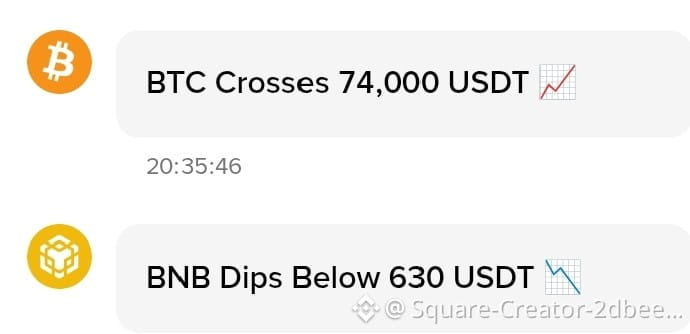
🚨 Price Alert: $BTC & $BNB Update 🚨
Bitcoin ($BTC) is currently trading near an important resistance zone as traders wait for the next major breakout. Market sentiment remains bullish while buying pressure continues increasing on Binance.
🔥 BTC Alert: • Strong support holding steady • Whale activity increasing • Breakout could trigger major volatility • Traders watching key resistance closely
Meanwhile, BNB ($BNB) is also showing strength with growing activity across the Binance ecosystem. Increased trading volume and ecosystem expansion continue supporting BNB momentum.
⚡ BNB Alert: • Bullish market structure remains active • Binance ecosystem growth supporting price • Investors monitoring breakout confirmation • Strong community confidence visible
Crypto traders should remain alert because sudden market moves can create both opportunities and risks in highly volatile conditions.
#BTC #BNB #Bitcoin #Crypto #Binance #Bullish #PriceAlert
🚨 Price Alert: $BTC & $BNB Update 🚨
Bitcoin ($BTC ) is currently trading near an important resistance zone as traders wait for the next major breakout. Market sentiment remains bullish while buying pressure continues increasing on Binance.
🔥 BTC Alert: • Strong support holding steady • Whale activity increasing • Breakout could trigger major volatility • Traders watching key resistance closely
Meanwhile, BNB ($BNB ) is also showing strength with growing activity across the Binance ecosystem. Increased trading volume and ecosystem expansion continue supporting BNB momentum.
⚡ BNB Alert: • Bullish market structure remains active • Binance ecosystem growth supporting price • Investors monitoring breakout confirmation • Strong community confidence visible
Crypto traders should remain alert because sudden market moves can create both opportunities and risks in highly volatile conditions.
#BTC #BNB #Bitcoin #Crypto #Binance #Bullish #PriceAlert
Bitcoin ($BTC ) is currently trading near an important resistance zone as traders wait for the next major breakout. Market sentiment remains bullish while buying pressure continues increasing on Binance.
🔥 BTC Alert: • Strong support holding steady • Whale activity increasing • Breakout could trigger major volatility • Traders watching key resistance closely
Meanwhile, BNB ($BNB ) is also showing strength with growing activity across the Binance ecosystem. Increased trading volume and ecosystem expansion continue supporting BNB momentum.
⚡ BNB Alert: • Bullish market structure remains active • Binance ecosystem growth supporting price • Investors monitoring breakout confirmation • Strong community confidence visible
Crypto traders should remain alert because sudden market moves can create both opportunities and risks in highly volatile conditions.
#BTC #BNB #Bitcoin #Crypto #Binance #Bullish #PriceAlert
9

·
--
🚨 BTC • BNB • ETH — THREE MAJOR CRYPTO ALERTS! 📈🔥
₿ Bitcoin (BTC) — Crossed 87,000 USDT
🟡 BNB — Crossed 780 USDT
💎 Ethereum (ETH) — Crossed 2,700 USDT
Three major names, three important price levels. 👀📊
The market is moving fast, and these price alerts are definitely worth keeping an eye on!
💬 BTC, BNB or ETH — which one are you watching most?
❤️ Like | 🔄 Share | ➕ Follow for more crypto updates!
#BTC #Bitcoin #BNB #ETH #Ethereum #Crypto #Binance #CryptoMarket #Trading #PriceAlert
🚨 CRYPTO PRICE ALERT — THE MARKET IS MOVING! 📈🔥
Bitcoin (BTC) has crossed 87,000 USDT, while BNB has crossed 780 USDT and Ethereum (ETH) has crossed 2,700 USDT according to the price alerts shown in the image.
The crypto market can move quickly, so keeping an eye on important price levels and market trends is essential. 📊👀
💬 Which one are you watching right now — BTC, BNB, or ETH?
❤️ Like | 🔄 Share | ➕ Follow for more crypto updates!
This is for informational purposes, not financial advice. Always do your own research before trading.
#Bitcoin #BTC #BNB #Ethereum #ETH #Crypto #Binance #CryptoMarket #Trading #PriceAlert #CryptoUpdate
🚨 BTC • BNB • ETH — THREE MAJOR CRYPTO ALERTS! 📈🔥
₿ Bitcoin (BTC) — Crossed 87,000 USDT
🟡 BNB — Crossed 780 USDT
💎 Ethereum (ETH) — Crossed 2,700 USDT
Three major names, three important price levels. 👀📊
The market is moving fast, and these price alerts are definitely worth keeping an eye on!
💬 BTC, BNB or ETH — which one are you watching most?
❤️ Like | 🔄 Share | ➕ Follow for more crypto updates!
#BTC #Bitcoin #BNB #ETH #Ethereum #Crypto #Binance #CryptoMarket #Trading #PriceAlert
🚨 CRYPTO PRICE ALERT — THE MARKET IS MOVING! 📈🔥
Bitcoin (BTC) has crossed 87,000 USDT, while BNB has crossed 780 USDT and Ethereum (ETH) has crossed 2,700 USDT according to the price alerts shown in the image.
The crypto market can move quickly, so keeping an eye on important price levels and market trends is essential. 📊👀
💬 Which one are you watching right now — BTC, BNB, or ETH?
❤️ Like | 🔄 Share | ➕ Follow for more crypto updates!
This is for informational purposes, not financial advice. Always do your own research before trading.
#Bitcoin #BTC #BNB #Ethereum #ETH #Crypto #Binance #CryptoMarket #Trading #PriceAlert #CryptoUpdate
₿ Bitcoin (BTC) — Crossed 87,000 USDT
🟡 BNB — Crossed 780 USDT
💎 Ethereum (ETH) — Crossed 2,700 USDT
Three major names, three important price levels. 👀📊
The market is moving fast, and these price alerts are definitely worth keeping an eye on!
💬 BTC, BNB or ETH — which one are you watching most?
❤️ Like | 🔄 Share | ➕ Follow for more crypto updates!
#BTC #Bitcoin #BNB #ETH #Ethereum #Crypto #Binance #CryptoMarket #Trading #PriceAlert
🚨 CRYPTO PRICE ALERT — THE MARKET IS MOVING! 📈🔥
Bitcoin (BTC) has crossed 87,000 USDT, while BNB has crossed 780 USDT and Ethereum (ETH) has crossed 2,700 USDT according to the price alerts shown in the image.
The crypto market can move quickly, so keeping an eye on important price levels and market trends is essential. 📊👀
💬 Which one are you watching right now — BTC, BNB, or ETH?
❤️ Like | 🔄 Share | ➕ Follow for more crypto updates!
This is for informational purposes, not financial advice. Always do your own research before trading.
#Bitcoin #BTC #BNB #Ethereum #ETH #Crypto #Binance #CryptoMarket #Trading #PriceAlert #CryptoUpdate

112

Crypto moves fast — price alerts help you move smarter.
Instead of watching charts all day, set a target and get notified when the market hits your price. It saves time, reduces emotional trading, and helps you stick to your strategy. Simple tool, big advantage. #Crypto #Trading #Binance #PriceAlert
Crypto moves fast — price alerts help you move smarter.
Instead of watching charts all day, set a target and get notified when the market hits your price. It saves time, reduces emotional trading, and helps you stick to your strategy. Simple tool, big advantage. #Crypto #Trading #Binance #PriceAlert
Instead of watching charts all day, set a target and get notified when the market hits your price. It saves time, reduces emotional trading, and helps you stick to your strategy. Simple tool, big advantage. #Crypto #Trading #Binance #PriceAlert
79

·
--
⚡ QUICK FLUCTUATIONS — $HEI -5.9% in 15 minutes
📊 Volume is 5.2× the normal level ($3.9M in 15 minutes)
🌊 Taker skew is SELL 7%
💰 Current price 0.11742 (24h +4.6%)
💬 A fast drop with large volume often comes with a technical rebound cycle — but catching a falling knife is the riskiest thing.
👉 Follow to get real-time alerts on money flow & liquidations.
$BTC #HEIUSDT #PriceAlert
⚡ QUICK FLUCTUATIONS — $HEI -5.9% in 15 minutes
📊 Volume is 5.2× the normal level ($3.9M in 15 minutes)
🌊 Taker skew is SELL 7%
💰 Current price 0.11742 (24h +4.6%)
💬 A fast drop with large volume often comes with a technical rebound cycle — but catching a falling knife is the riskiest thing.
👉 Follow to get real-time alerts on money flow & liquidations.
$BTC #HEIUSDT #PriceAlert
📊 Volume is 5.2× the normal level ($3.9M in 15 minutes)
🌊 Taker skew is SELL 7%
💰 Current price 0.11742 (24h +4.6%)
💬 A fast drop with large volume often comes with a technical rebound cycle — but catching a falling knife is the riskiest thing.
👉 Follow to get real-time alerts on money flow & liquidations.
$BTC #HEIUSDT #PriceAlert
200
·
--
⚡ SHARP MOVE — $SKYAI -6.6% in 15 min
📊 Volume 5.2× the norm ($23.6M over 15 min)
🌊 Taker lean SELL 8%
💰 Current price 0.03670 (24h +28.9%)
💬 A fast drop on heavy volume usually brings a technical bounce — but catching a falling knife is the riskiest move.
👉 Follow for real-time money-flow & liquidation alerts.
$BTC #SKYAIUSDT #PriceAlert
⚡ SHARP MOVE — $SKYAI -6.6% in 15 min
📊 Volume 5.2× the norm ($23.6M over 15 min)
🌊 Taker lean SELL 8%
💰 Current price 0.03670 (24h +28.9%)
💬 A fast drop on heavy volume usually brings a technical bounce — but catching a falling knife is the riskiest move.
👉 Follow for real-time money-flow & liquidation alerts.
$BTC #SKYAIUSDT #PriceAlert
📊 Volume 5.2× the norm ($23.6M over 15 min)
🌊 Taker lean SELL 8%
💰 Current price 0.03670 (24h +28.9%)
💬 A fast drop on heavy volume usually brings a technical bounce — but catching a falling knife is the riskiest move.
👉 Follow for real-time money-flow & liquidation alerts.
$BTC #SKYAIUSDT #PriceAlert
80

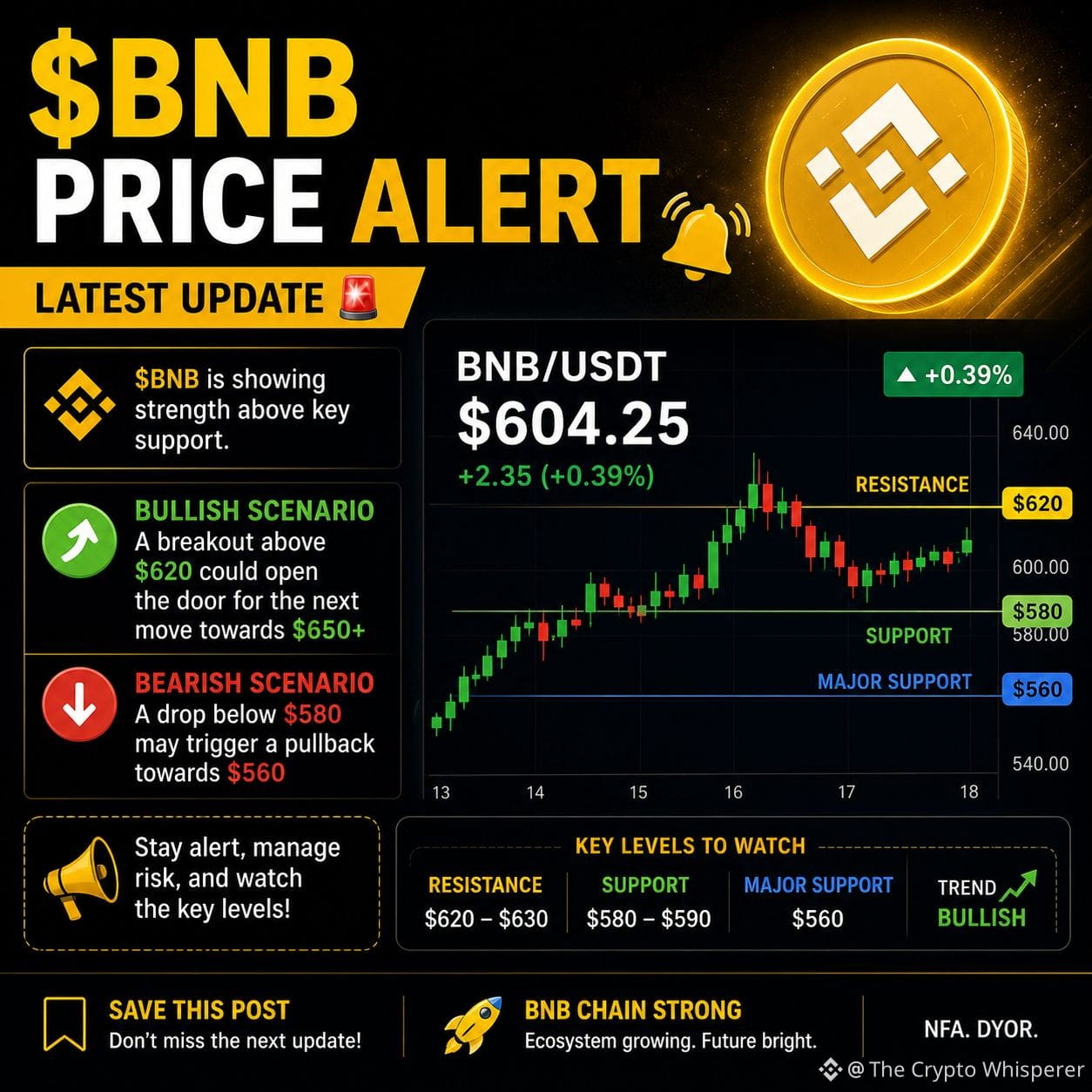
🚨 BNB PRICE ALERT
$BNB is holding a key support zone as traders watch for the next breakout. A strong move above resistance could reignite bullish momentum, while losing support may trigger short-term volatility.
With BNB Chain ecosystem activity remaining in focus, keep an eye on volume and overall market sentiment before the next big move.
#BNB #Binance #Crypto #Altcoins #PriceAlert
{spot}(BNBUSDT)
🚨 BNB PRICE ALERT
$BNB is holding a key support zone as traders watch for the next breakout. A strong move above resistance could reignite bullish momentum, while losing support may trigger short-term volatility.
With BNB Chain ecosystem activity remaining in focus, keep an eye on volume and overall market sentiment before the next big move.
#BNB #Binance #Crypto #Altcoins #PriceAlert
$BNB is holding a key support zone as traders watch for the next breakout. A strong move above resistance could reignite bullish momentum, while losing support may trigger short-term volatility.
With BNB Chain ecosystem activity remaining in focus, keep an eye on volume and overall market sentiment before the next big move.
#BNB #Binance #Crypto #Altcoins #PriceAlert
32

·
--
Bullish
Stop watching charts all day—use price alerts instead
Constantly checking prices can lead to emotional decisions.
A calmer workflow: • Choose assets you want to monitor
• Set a price or percentage alert
• Review the reason behind the move when the alert triggers
• Avoid reacting only because a candle is green or red
An alert is a reminder to research—not an automatic signal to trade.
Build a process. Let emotions follow the process, not lead it.
#CryptoTips #PriceAlert #TradingPsychology $AMZNB
{spot}(AMZNBUSDT)
$METAB
{spot}(METABUSDT)
$GOOGLB
{spot}(GOOGLBUSDT)
Stop watching charts all day—use price alerts instead
Constantly checking prices can lead to emotional decisions.
A calmer workflow: • Choose assets you want to monitor
• Set a price or percentage alert
• Review the reason behind the move when the alert triggers
• Avoid reacting only because a candle is green or red
An alert is a reminder to research—not an automatic signal to trade.
Build a process. Let emotions follow the process, not lead it.
#CryptoTips #PriceAlert #TradingPsychology $AMZNB
$METAB
$GOOGLB
Constantly checking prices can lead to emotional decisions.
A calmer workflow: • Choose assets you want to monitor
• Set a price or percentage alert
• Review the reason behind the move when the alert triggers
• Avoid reacting only because a candle is green or red
An alert is a reminder to research—not an automatic signal to trade.
Build a process. Let emotions follow the process, not lead it.
#CryptoTips #PriceAlert #TradingPsychology $AMZNB
$METAB
$GOOGLB
57

·
--
🇨🇳 🔴 BSB Volatility
🔴 Dropped 2.5% in the last 3 seconds!
💰 Token: BSBUSDT (BSB)
📊 Signal Type: Price Monitoring
⏱️ Time Frame: 3 Seconds
⚠️ Note: 3-second fluctuations may be triggered by large orders or changes in liquidity; it's advisable to consider larger time frames for a comprehensive assessment
---
🇺🇸 Price Alert
🔴 BSBUSDT down 2.5% in the past 3 seconds!
⚠️ High volatility - trade with caution!
#BSB #PriceAlert
🇨🇳 🔴 BSB Volatility
🔴 Dropped 2.5% in the last 3 seconds!
💰 Token: BSBUSDT (BSB)
📊 Signal Type: Price Monitoring
⏱️ Time Frame: 3 Seconds
⚠️ Note: 3-second fluctuations may be triggered by large orders or changes in liquidity; it's advisable to consider larger time frames for a comprehensive assessment
---
🇺🇸 Price Alert
🔴 BSBUSDT down 2.5% in the past 3 seconds!
⚠️ High volatility - trade with caution!
#BSB #PriceAlert
🔴 Dropped 2.5% in the last 3 seconds!
💰 Token: BSBUSDT (BSB)
📊 Signal Type: Price Monitoring
⏱️ Time Frame: 3 Seconds
⚠️ Note: 3-second fluctuations may be triggered by large orders or changes in liquidity; it's advisable to consider larger time frames for a comprehensive assessment
---
🇺🇸 Price Alert
🔴 BSBUSDT down 2.5% in the past 3 seconds!
⚠️ High volatility - trade with caution!
#BSB #PriceAlert
695

·
--
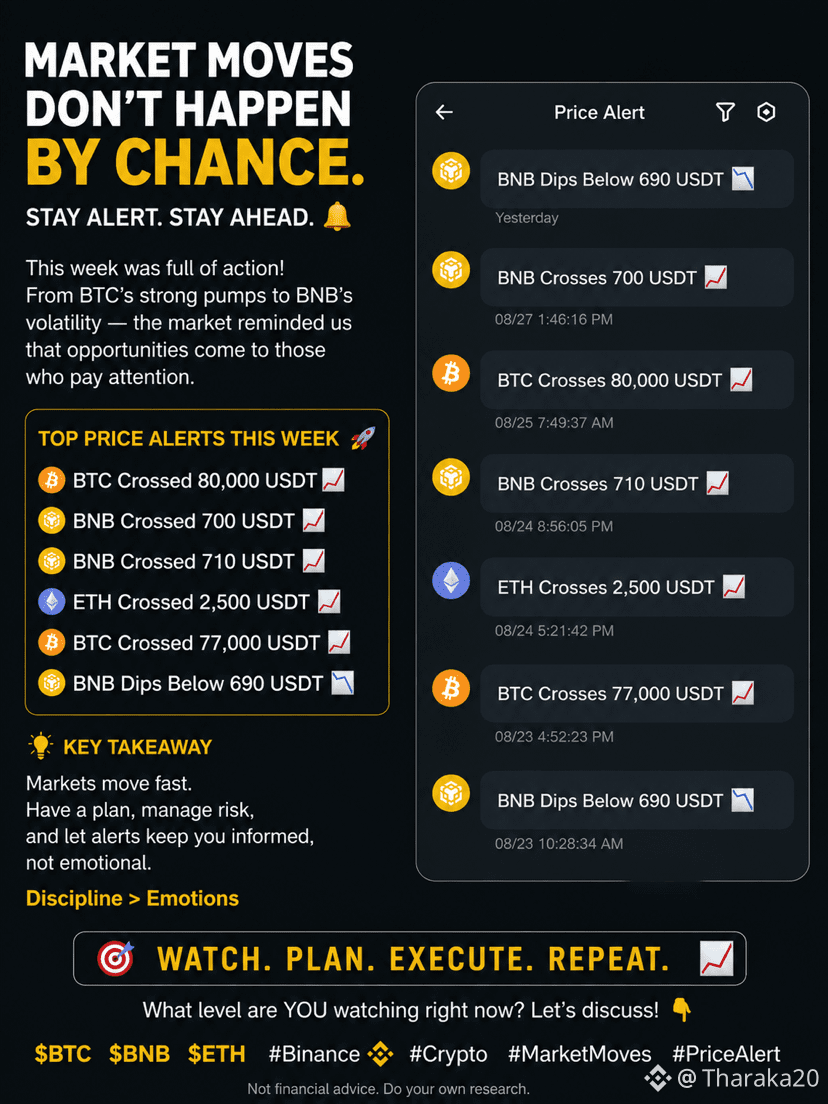
📊 Market moves don’t happen by chance.
This week’s price alerts caught some interesting moves 👀
🔸 BTC crossed $80,000
🔸 BNB moved above $700 & $710
🔸 ETH crossed $2,500
🔸 BNB also dipped below $690
The takeaway? Don’t chase the market—watch the levels, manage your risk, and have a plan before you enter. 📈
Which level are you watching next? 👇
$BTC $BNB $ETH
#BinanceSquare #Crypto #Bitcoin #bnb #Ethereum #trading #CryptoMarketMoves #PriceAlert
📊 Market moves don’t happen by chance.
This week’s price alerts caught some interesting moves 👀
🔸 BTC crossed $80,000
🔸 BNB moved above $700 & $710
🔸 ETH crossed $2,500
🔸 BNB also dipped below $690
The takeaway? Don’t chase the market—watch the levels, manage your risk, and have a plan before you enter. 📈
Which level are you watching next? 👇
$BTC $BNB $ETH
#BinanceSquare #Crypto #Bitcoin #bnb #Ethereum #trading #CryptoMarketMoves #PriceAlert
This week’s price alerts caught some interesting moves 👀
🔸 BTC crossed $80,000
🔸 BNB moved above $700 & $710
🔸 ETH crossed $2,500
🔸 BNB also dipped below $690
The takeaway? Don’t chase the market—watch the levels, manage your risk, and have a plan before you enter. 📈
Which level are you watching next? 👇
$BTC $BNB $ETH
#BinanceSquare #Crypto #Bitcoin #bnb #Ethereum #trading #CryptoMarketMoves #PriceAlert
103

·
--
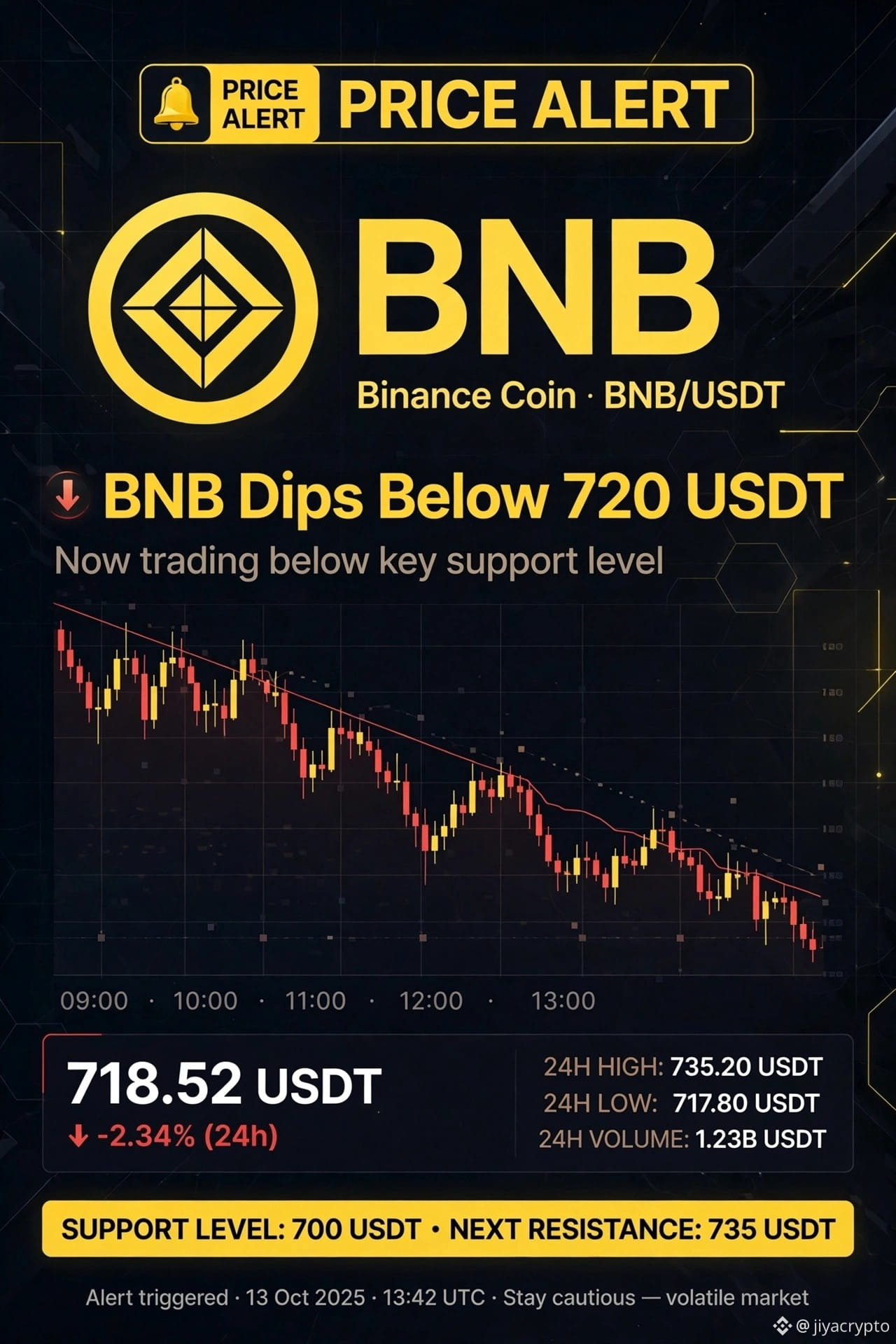
🚨 $BNB PRICE ALERT 🚨
$BNB Dips Below 720 USDT 📉 - Currently $718.52 (-2.34%)
BNB is now testing a strong zone. If it holds above $700, we can expect a quick bounce back towards $735 - $750 in the next few days.
But if it breaks below $700 with high volume, the next support is around $680 - $665.
Short-term volatile, long-term still strong.
What is your target? Are you buying the dip?
#BNB #BinanceCoin #CryptoPrediction #PriceAlert
Not financial advice - Do your own research.
{future}(BNBUSDT)
🚨 $BNB PRICE ALERT 🚨
$BNB Dips Below 720 USDT 📉 - Currently $718.52 (-2.34%)
BNB is now testing a strong zone. If it holds above $700, we can expect a quick bounce back towards $735 - $750 in the next few days.
But if it breaks below $700 with high volume, the next support is around $680 - $665.
Short-term volatile, long-term still strong.
What is your target? Are you buying the dip?
#BNB #BinanceCoin #CryptoPrediction #PriceAlert
Not financial advice - Do your own research.
$BNB Dips Below 720 USDT 📉 - Currently $718.52 (-2.34%)
BNB is now testing a strong zone. If it holds above $700, we can expect a quick bounce back towards $735 - $750 in the next few days.
But if it breaks below $700 with high volume, the next support is around $680 - $665.
Short-term volatile, long-term still strong.
What is your target? Are you buying the dip?
#BNB #BinanceCoin #CryptoPrediction #PriceAlert
Not financial advice - Do your own research.
1
109

·
--
🚨 *CAMBO VIP PRICE ALERT* ⚡
⏱️ *Time:* Sun, 13 Sep 2026 07:58:26 GMT
🔔 *Key Level Reached / Asset Update:*
• Bitcoin (BTC/USDT): `$79,150.00`
• Ethereum (ETH/USDT): `$2,440.00`
⚠️ Volatility spike anticipated near major support/resistance barriers. Adjust your leverage!
#PriceAlert #CryptoTrading #Bitcoin
🚨 *CAMBO VIP PRICE ALERT* ⚡
⏱️ *Time:* Sun, 13 Sep 2026 07:58:26 GMT
🔔 *Key Level Reached / Asset Update:*
• Bitcoin (BTC/USDT): `$79,150.00`
• Ethereum (ETH/USDT): `$2,440.00`
⚠️ Volatility spike anticipated near major support/resistance barriers. Adjust your leverage!
#PriceAlert #CryptoTrading #Bitcoin
⏱️ *Time:* Sun, 13 Sep 2026 07:58:26 GMT
🔔 *Key Level Reached / Asset Update:*
• Bitcoin (BTC/USDT): `$79,150.00`
• Ethereum (ETH/USDT): `$2,440.00`
⚠️ Volatility spike anticipated near major support/resistance barriers. Adjust your leverage!
#PriceAlert #CryptoTrading #Bitcoin
28

·
--
🇨🇳 🟢 HANA Volatility
🟢 Spiked 5.2% in the last 3 seconds!
💰 Token: HANAUSDT (HANA)
📊 Signal Type: Price Monitoring
⏱️ Time Frame: 3 Seconds
⚠️ Note: 3-second fluctuations may be due to large trades or liquidity changes; it's advisable to consider broader timeframes for comprehensive analysis.
---
🇺🇸 Price Alert
🟢 HANAUSDT +5.2% in the past 3 seconds!
⚠️ High volatility - trade with caution!
#HANA #PriceAlert
🇨🇳 🟢 HANA Volatility
🟢 Spiked 5.2% in the last 3 seconds!
💰 Token: HANAUSDT (HANA)
📊 Signal Type: Price Monitoring
⏱️ Time Frame: 3 Seconds
⚠️ Note: 3-second fluctuations may be due to large trades or liquidity changes; it's advisable to consider broader timeframes for comprehensive analysis.
---
🇺🇸 Price Alert
🟢 HANAUSDT +5.2% in the past 3 seconds!
⚠️ High volatility - trade with caution!
#HANA #PriceAlert
🟢 Spiked 5.2% in the last 3 seconds!
💰 Token: HANAUSDT (HANA)
📊 Signal Type: Price Monitoring
⏱️ Time Frame: 3 Seconds
⚠️ Note: 3-second fluctuations may be due to large trades or liquidity changes; it's advisable to consider broader timeframes for comprehensive analysis.
---
🇺🇸 Price Alert
🟢 HANAUSDT +5.2% in the past 3 seconds!
⚠️ High volatility - trade with caution!
#HANA #PriceAlert
187

·
--
Bearish
#GoldTradesAbove$4000 #GOLD #PriceAlert
🚀GOLD BEARISH: SELLING ZONE AHEAD
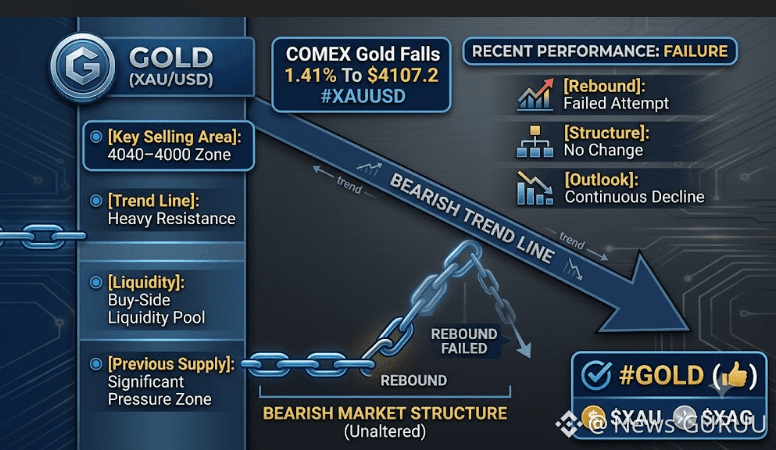
📉 Gold fell 1.41% to $4,107.20 and remains below the bearish trend line.
✅ Rebound failed to change the bearish structure
✅ $4,040–$4,000 remains a major resistance/supply zone
✅ Sellers still have the technical advantage
📊 Trading View: SELL — consider short positions near the $4,040–$4,000 resistance zone if price rejects there.
💬 Will Gold break below support next, or surprise the bears?
"CLICK ON THE BELOW YELLOW COIN TAG TO GO TO DESIRED TRADING PAGE TO GET BENEFIT TRADE"👇👇👇👇
$XAU $XAG
{future}(XAGUSDT)
{future}(XAUUSDT)
#GoldTradesAbove$4000 #GOLD #PriceAlert
🚀GOLD BEARISH: SELLING ZONE AHEAD
📉 Gold fell 1.41% to $4,107.20 and remains below the bearish trend line.
✅ Rebound failed to change the bearish structure
✅ $4,040–$4,000 remains a major resistance/supply zone
✅ Sellers still have the technical advantage
📊 Trading View: SELL — consider short positions near the $4,040–$4,000 resistance zone if price rejects there.
💬 Will Gold break below support next, or surprise the bears?
"CLICK ON THE BELOW YELLOW COIN TAG TO GO TO DESIRED TRADING PAGE TO GET BENEFIT TRADE"👇👇👇👇
$XAU $XAG
🚀GOLD BEARISH: SELLING ZONE AHEAD
📉 Gold fell 1.41% to $4,107.20 and remains below the bearish trend line.
✅ Rebound failed to change the bearish structure
✅ $4,040–$4,000 remains a major resistance/supply zone
✅ Sellers still have the technical advantage
📊 Trading View: SELL — consider short positions near the $4,040–$4,000 resistance zone if price rejects there.
💬 Will Gold break below support next, or surprise the bears?
"CLICK ON THE BELOW YELLOW COIN TAG TO GO TO DESIRED TRADING PAGE TO GET BENEFIT TRADE"👇👇👇👇
$XAU $XAG
2
233

🚨 BNB PRICE ALERT — $710 USDT! 📈
$BNB has just crossed the $710 USDT level, marking an important short-term price milestone.
{spot}(BNBUSDT)
📊 Key levels to watch:
🟢 $710: Current breakout/alert level
🎯 Above $710: Momentum could strengthen if buyers hold the level
🔴 Below $710: A pullback could bring selling pressure
⚠️ This is a price alert, not a guaranteed prediction. The next move will depend on volume and whether BNB can sustain above $710.
BNB traders — are we heading higher? 👀
#PriceAlert #BNBTops730USDT #BNBTops730USDT #BitcoinOpenInterestShareRisesTo42.1%
🚨 BNB PRICE ALERT — $710 USDT! 📈
$BNB has just crossed the $710 USDT level, marking an important short-term price milestone.
📊 Key levels to watch:
🟢 $710: Current breakout/alert level
🎯 Above $710: Momentum could strengthen if buyers hold the level
🔴 Below $710: A pullback could bring selling pressure
⚠️ This is a price alert, not a guaranteed prediction. The next move will depend on volume and whether BNB can sustain above $710.
BNB traders — are we heading higher? 👀
#PriceAlert #BNBTops730USDT #BNBTops730USDT #BitcoinOpenInterestShareRisesTo42.1%
$BNB has just crossed the $710 USDT level, marking an important short-term price milestone.
📊 Key levels to watch:
🟢 $710: Current breakout/alert level
🎯 Above $710: Momentum could strengthen if buyers hold the level
🔴 Below $710: A pullback could bring selling pressure
⚠️ This is a price alert, not a guaranteed prediction. The next move will depend on volume and whether BNB can sustain above $710.
BNB traders — are we heading higher? 👀
#PriceAlert #BNBTops730USDT #BNBTops730USDT #BitcoinOpenInterestShareRisesTo42.1%

36

🚨 $BNB Price Alert: What Does It Mean for Traders?
A new price alert has caught the attention of crypto traders: BNB has crossed 650 USDT. This move signals strong buying pressure and growing market interest in one of the largest cryptocurrencies.
As BNB breaks above this key level, traders are watching closely to see whether the price can maintain its momentum and push toward higher resistance zones. A successful hold above 650 USDT could indicate further bullish movement, while a drop below this level may lead to short-term consolidation.
Key Factors Behind the Move
✅ Increased market activity
✅ Positive sentiment in the crypto market
✅ Strong demand for $BNB -related services and trading
What Traders Should Watch
Trading volume
Support levels near 650 USDT
Overall Bitcoin market direction
Upcoming crypto news and events
$BNB's latest breakout highlights the importance of staying informed and setting timely price alerts. Whether you're a long-term investor or an active trader, monitoring key levels can help you make better decisions in a fast-moving market.
#BNB #CryptoNews #PriceAlert #GENIUSBinanceHODLer 📈🚀
🚨 $BNB Price Alert: What Does It Mean for Traders?
A new price alert has caught the attention of crypto traders: BNB has crossed 650 USDT. This move signals strong buying pressure and growing market interest in one of the largest cryptocurrencies.
As BNB breaks above this key level, traders are watching closely to see whether the price can maintain its momentum and push toward higher resistance zones. A successful hold above 650 USDT could indicate further bullish movement, while a drop below this level may lead to short-term consolidation.
Key Factors Behind the Move
✅ Increased market activity
✅ Positive sentiment in the crypto market
✅ Strong demand for $BNB -related services and trading
What Traders Should Watch
Trading volume
Support levels near 650 USDT
Overall Bitcoin market direction
Upcoming crypto news and events
$BNB 's latest breakout highlights the importance of staying informed and setting timely price alerts. Whether you're a long-term investor or an active trader, monitoring key levels can help you make better decisions in a fast-moving market.
#BNB #CryptoNews #PriceAlert #GENIUSBinanceHODLer 📈🚀
A new price alert has caught the attention of crypto traders: BNB has crossed 650 USDT. This move signals strong buying pressure and growing market interest in one of the largest cryptocurrencies.
As BNB breaks above this key level, traders are watching closely to see whether the price can maintain its momentum and push toward higher resistance zones. A successful hold above 650 USDT could indicate further bullish movement, while a drop below this level may lead to short-term consolidation.
Key Factors Behind the Move
✅ Increased market activity
✅ Positive sentiment in the crypto market
✅ Strong demand for $BNB -related services and trading
What Traders Should Watch
Trading volume
Support levels near 650 USDT
Overall Bitcoin market direction
Upcoming crypto news and events
$BNB 's latest breakout highlights the importance of staying informed and setting timely price alerts. Whether you're a long-term investor or an active trader, monitoring key levels can help you make better decisions in a fast-moving market.
#BNB #CryptoNews #PriceAlert #GENIUSBinanceHODLer 📈🚀
76

·
--
Article
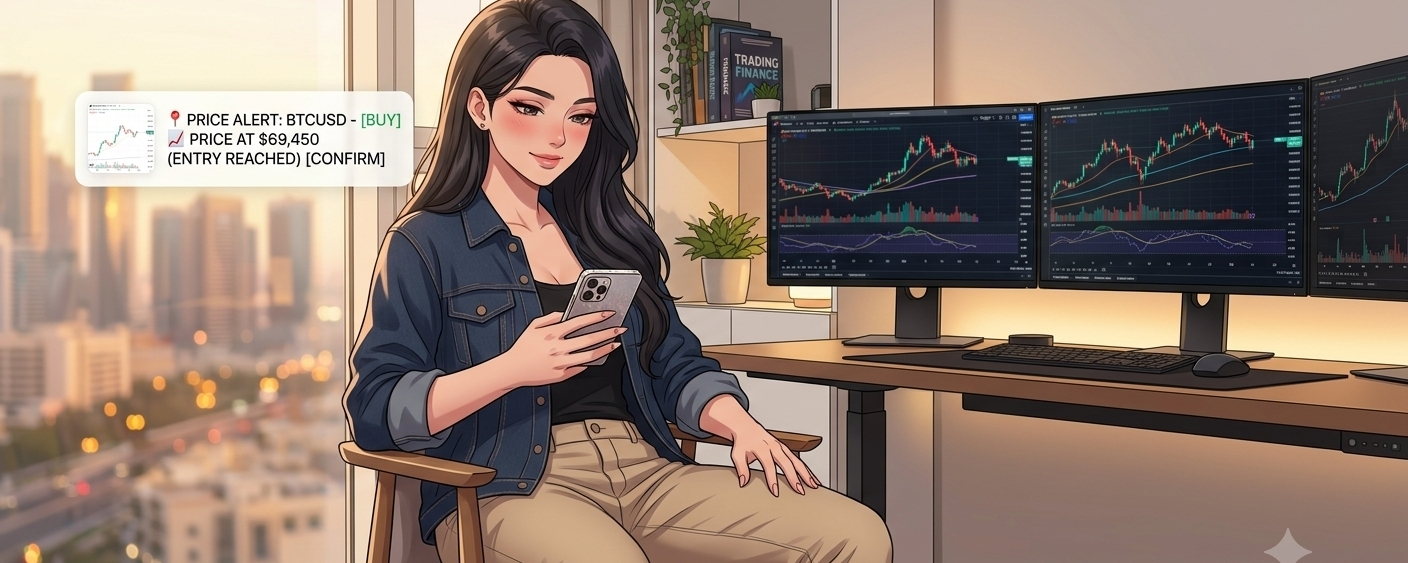
🔥 You lose your trades before they even begin… just because you watch the chart more than you should.Many traders think that monitoring the chart every minute gives them more control, but what often happens is exactly the opposite. Every small movement starts to affect the psyche: fear, impatience, late entry, or an ill-considered exit. Over time, the decision is no longer based on a clear plan, but on an instant reaction. This is where the value of a price alert becomes evident as a simple yet very smart tool.
🔥 You lose your trades before they even begin… just because you watch the chart more than you should.
Many traders think that monitoring the chart every minute gives them more control, but what often happens is exactly the opposite. Every small movement starts to affect the psyche: fear, impatience, late entry, or an ill-considered exit. Over time, the decision is no longer based on a clear plan, but on an instant reaction. This is where the value of a price alert becomes evident as a simple yet very smart tool.
1
4
154

·
--
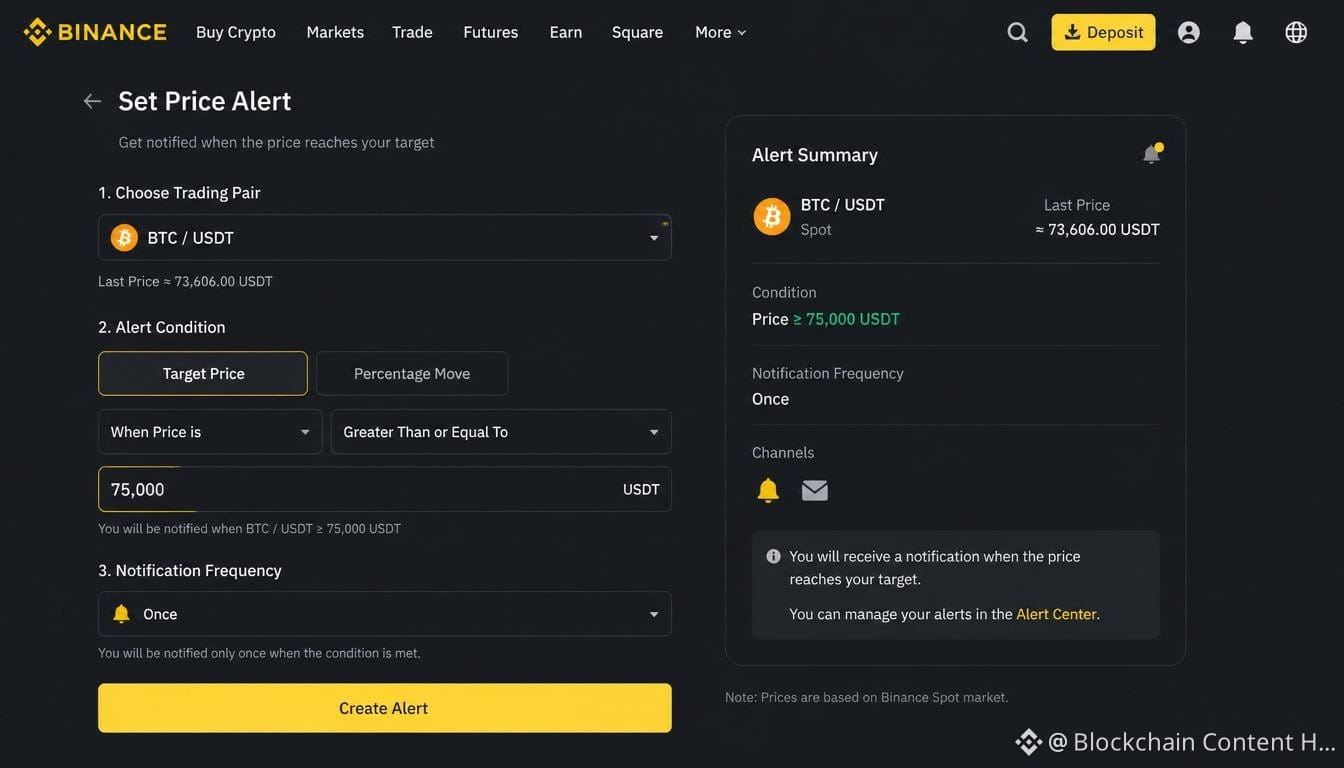
Set a Binance price alert for any crypto pair by choosing a target price or % move and how often to be notified — BTC is currently at ~$73,606 USDT.
#Binance #PriceAlert #Bitcoin #CryptoTools
Set a Binance price alert for any crypto pair by choosing a target price or % move and how often to be notified — BTC is currently at ~$73,606 USDT.
#Binance #PriceAlert #Bitcoin #CryptoTools
#Binance #PriceAlert #Bitcoin #CryptoTools
1
77
Log in to explore more content
Join global crypto users on Binance Square
⚡️ Get latest and useful information about crypto.
💬 Trusted by the world’s largest crypto exchange.
👍 Discover real insights from verified creators.
Email / Phone number
Trending Topics
1
#CanBTCReboundAfterFallingBelow60K?
418,790 views
1,779 Discussing
2
#GlobalStocksFaceLongestLosingStreakSince2023
140,649 views
1,251 Discussing
3
#BlackRockIBITPostsRecord$541MSingleDayOutflow
2,552 views
36 Discussing
4
#AnthropicPlungesTowardIPOPriceonDay2
67,063 views
700 Discussing
5
#TwentyOneCapitalAdds172.25BTC
17,923 views
237 Discussing
6
#HKBillWouldExcludeTokenizedDepositsFromVirtualAssets
2,016 views
25 Discussing
7
#BNBDropsBelow540USDTWith8.46%DailyDecline
39,003 views
341 Discussing
8
#HKBillProposesHK$100KFineForUnauthorizedCryptoTitles
1,289 views
19 Discussing
9
#BitMineFaces$10.1BUnrealizedETHLoss
2,315 views
24 Discussing
10
#StrategyReports$35BNetReserves
2,225 views
18 Discussing